




Fake VS Code Security Alerts on GitHub Push Malware
Key Takeaways A widespread phishing campaign is targeting GitHub developers with fake Visual Studio Code (VS Code) security alerts. These malicious notifications, appearing in GitHub Discussions, aim...

Key Takeaways
- A widespread phishing campaign is targeting GitHub developers with fake Visual Studio Code (VS Code) security alerts.
- These malicious notifications, appearing in GitHub Discussions, aim to trick users into downloading malware disguised as urgent security updates.
- The attackers exploit GitHub’s notification system and browser fingerprinting to deliver payloads, making the threats appear legitimate and urgent.
- Developers should only obtain VS Code updates from official Microsoft channels and remain highly skeptical of unsolicited security advisories on GitHub.
Widespread Phishing Campaign Targets GitHub Developers with Fake VS Code Alerts
A sophisticated phishing campaign is actively targeting software developers on GitHub, leveraging highly convincing but fake Visual Studio Code security alerts. These deceptive notifications, disseminated through GitHub Discussions, are designed to lure unsuspecting users into downloading malicious software under the guise of critical security patches.
Table Of Content
The attacks meticulously mimic official security advisories, warning developers of severe vulnerabilities within VS Code. They urgently prompt users to install a “patched” version of the IDE via external links that bypass legitimate distribution channels.
Campaign Mechanics and Deception Tactics
The operation manifests through thousands of nearly identical posts that rapidly flood GitHub repositories. These posts often appear within minutes of each other, suggesting a highly automated and coordinated effort.
Each post is crafted to resemble an authoritative security warning, featuring alarming titles such as “Visual Studio Code – Severe Vulnerability – Immediate Update Required,” “Critical Exploit – Urgent Action Needed,” and “Severe Threat – Update Immediately.” To enhance their credibility, the attackers frequently reference fabricated CVE IDs and non-existent version ranges.
A critical element of this campaign’s success lies in its abuse of GitHub’s notification system. Since GitHub Discussions automatically trigger email alerts to repository participants and watchers, these fraudulent advisories are delivered directly to developers’ inboxes. This significantly expands the campaign’s reach beyond the platform itself, making the fake warnings difficult to ignore.
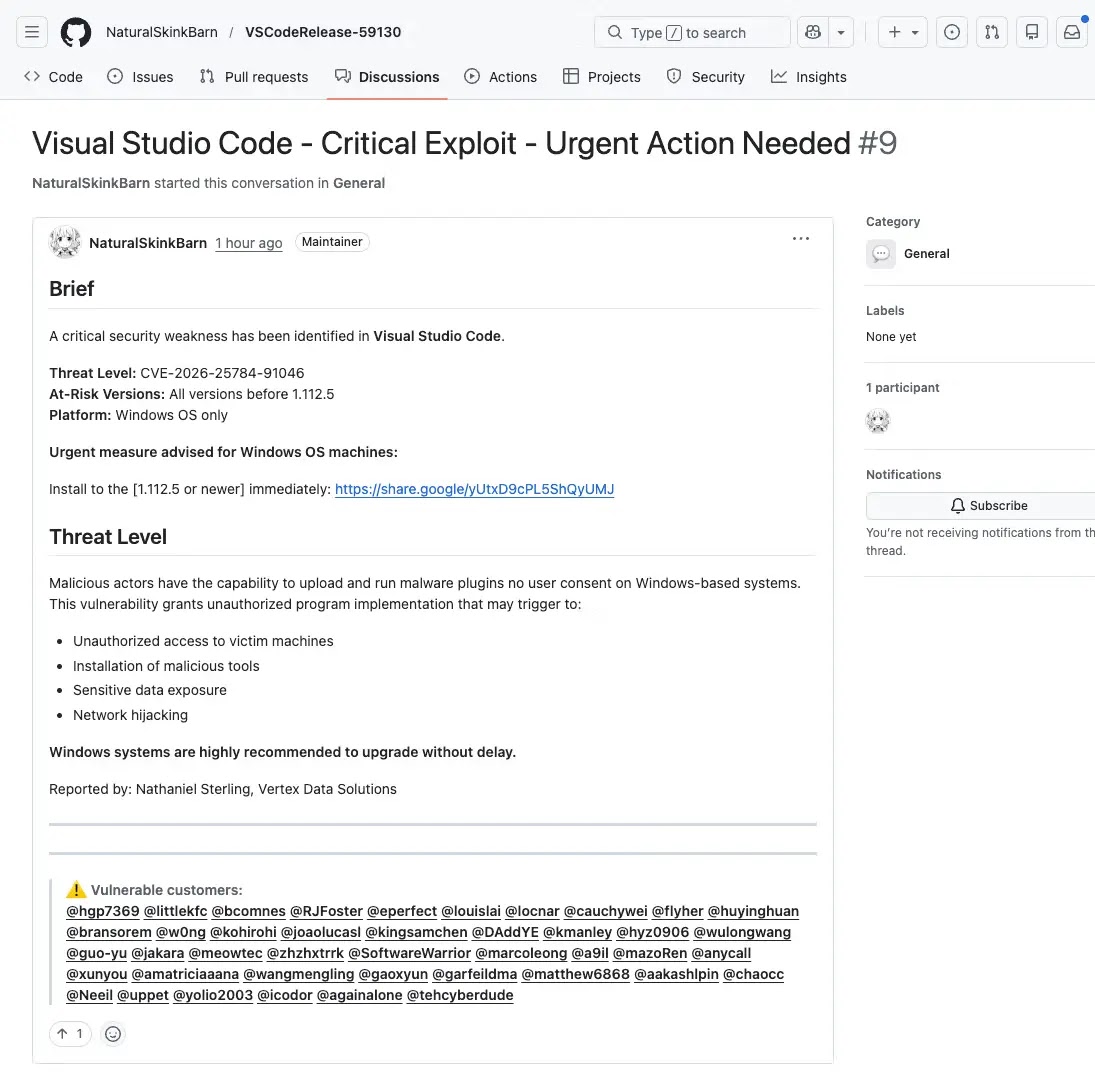
Analysts at Socket.dev identified this as a coordinated spam operation. They observed that the posts originated from newly created or accounts with minimal activity. These accounts indiscriminately tagged numerous developers across unrelated repositories to maximize exposure and engagement. The researchers highlighted that the campaign exploits GitHub’s inherent notification mechanisms, making the fake alerts appear both urgent and genuinely platform-generated, thereby eroding a developer’s natural skepticism.
Each fraudulent Discussion includes a link purporting to offer the updated VS Code version. However, these links redirect to file-sharing services, not official Microsoft distribution channels. Legitimate VS Code updates are never disseminated in this manner. The urgency embedded in these posts, combined with the trusted environment of GitHub, is often sufficient to prompt developers to click without proper verification. This sophisticated attack seamlessly integrates into GitHub’s collaborative workspace, transforming a daily professional tool into a vector for malware delivery.
The sheer scale of this campaign is particularly concerning. Hundreds, if not thousands, of these posts appeared in GitHub search results in rapid succession, indicating an advanced, automated infrastructure. The shift from traditional phishing emails to targeting developers within a platform they use and trust daily represents a significant evolution in attacker methodologies.
Multi-Step Redirection and Browser Fingerprinting
Socket.dev analysts meticulously tracked one of the payloads linked in these fake Discussions, uncovering a sophisticated multi-step redirection chain. Upon clicking a malicious link, victims are first routed through a Google share endpoint. From there, the redirection path diverges based on the presence of a valid Google cookie in the user’s browser.
Users possessing a Google cookie are automatically subjected to a 301 redirect, leading them to an attacker-controlled domain, drnatashachinn[.]com, which functions as the campaign’s command-and-control server. Conversely, users without a Google cookie are served a browser fingerprinting page directly from the initial Google endpoint. This likely serves as a fallback mechanism designed to filter out bots and automated security scanners, ensuring that only genuine human targets proceed further into the attack chain.
Once a legitimate user lands on the attacker’s infrastructure, an obfuscated JavaScript payload immediately executes. This script comprehensively gathers browser fingerprint data, including the user’s timezone, locale, platform, user agent, and automation signals such as navigator.webdriver. This data is crucial for determining whether the visitor is a real person or an automated bot. Furthermore, a hidden iframe performs an additional cross-check of the user agent to detect spoofed browser environments. All collected data is then silently transmitted to the attacker’s endpoint via an automatic POST request, requiring no interaction from the victim. This meticulous profiling stage acts as a critical filtering layer, distinguishing real users from security scanners before routing confirmed targets to subsequent payloads, which could include advanced phishing pages or exploit kits.
What You Should Do
- Verify All Security Alerts: Treat any unsolicited security alerts in GitHub Discussions with extreme caution.
- Check Download Sources: Never download VS Code updates from external links, especially those pointing to file-sharing services. Always obtain updates directly from official Microsoft channels.
- Scrutinize Post Details: Be wary of posts that include unverifiable CVE references, urgent installation instructions, mass tagging of unrelated users, or originate from recently created or low-activity GitHub accounts.
- Report Suspicious Activity: If you encounter a suspicious GitHub Discussion, report it immediately to GitHub for review.
- Enable Multi-Factor Authentication (MFA): Ensure MFA is enabled on your GitHub account and all associated services to add an extra layer of security.
Disclaimer: HackersRadar reports on cybersecurity threats and incidents for informational and awareness purposes only. We do not engage in hacking activities, data exfiltration, or the hosting or distribution of stolen or leaked information. All content is based on publicly available sources.








No Comment! Be the first one.