




WhatsApp Crypt Tool to Encrypt and Decrypt WhatsApp Backups
WhatsApp Crypt Tool: Encrypt & Decrypt Your Backup So, imagine you’re dealing with encrypted WhatsApp backups. It’s a bit of a headache, right? Well, there’s a pretty cool...

WhatsApp Crypt Tool: Encrypt & Decrypt Your Backup
So, imagine you’re dealing with encrypted WhatsApp backups. It’s a bit of a headache, right? Well, there’s a pretty cool open-source solution out there called the wa-crypt-tools suite, and it lives on GitHub. This handy suite can both decrypt and encrypt those tricky .crypt12, .crypt14, and .crypt15 files from your regular WhatsApp or even WhatsApp Business. The only thing you’ll need to supply is either the specific key file or a 64-character key to get it working.
wa-crypt-tools simplifies access to WhatsApp’s end-to-end encrypted backups, which store chat histories, media, and metadata in SQLite databases or ZIP archives.
Developed by ElDavoo, it integrates protobuf handling for modern formats and pairs well with full forensics suites like whapa for deeper analysis.
Users can deploy the tool via multiple routes without local setup hassles. Google Colab offers a browser-based notebook for quick tests, ideal for non-technical users or cloud workflows.
Locally, install via pip with “python -m pip install wa-crypt-tools” for stable builds or the GitHub URL for development versions; Jupyter notebooks suit data scientists familiar with the environment.
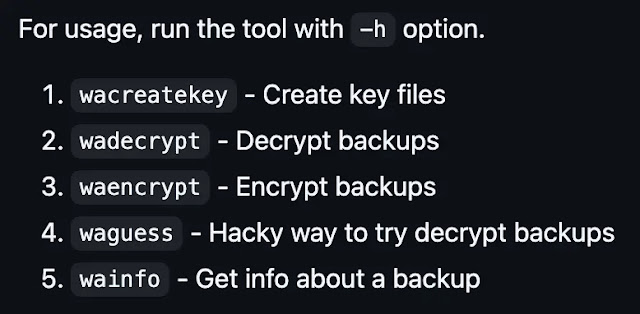
Decryption shines with the wadecrypt command: “wadecrypt encrypted_backup.key msgstore.db.crypt15 msgstore.db” yields a readable SQLite file after loading the Crypt15 key.

Encryption via waencrypt remains beta, recommending a reference crypt15 file for reliability, as in “waencrypt –reference msgstore.db.crypt15 key msgstore.db new.crypt15.” Additional utilities like wainfo inspect backups, wacreatekey generates keys, and waguess attempt brute-force guesses.

Cybersecurity professionals leverage this for mobile forensics, extracting evidence from rooted Android devices at /data/data/com.whatsapp/files/key.
Research papers quote it to analyze disappearing messages and injection attacks on E2EE apps, while tutorials on YouTube and XDA tutorials help users recover from .crypt15 backups via ADB pulls. It supports .mcrypt1 Google Drive files too, though undocumented.
No decryption occurs without the key passwords; they protect only the key retrieval from WhatsApp servers. Compatibility lags newer app versions (last tested 2.24.x), with open issues like crypt15 failures prompting force flags or developer support via Telegram.
Experts recommend E2EE backups without passwords, self-managed keys via wacreatekey, and safe storage to avoid WhatsApp rotations.
This tool enables ethical forensics without rooting any device and underscores WhatsApp’s robust encryption when keys remain secure.
Disclaimer: HackersRadar reports on cybersecurity threats and incidents for informational and awareness purposes only. We do not engage in hacking activities, data exfiltration, or the hosting or distribution of stolen or leaked information. All content is based on publicly available sources.








No Comment! Be the first one.