




Google Chrome Gets Device-Bound Sessions to Prevent Cookie Theft
Key Takeaways Google has rolled out Device Bound Session Credentials (DBSC) for Chrome on Windows, with a macOS release planned. DBSC significantly enhances security by linking authentication...

Key Takeaways
- Google has rolled out Device Bound Session Credentials (DBSC) for Chrome on Windows, with a macOS release planned.
- DBSC significantly enhances security by linking authentication sessions directly to a user’s physical device hardware, such as a TPM.
- This new protocol aims to prevent session hijacking and cookie theft, a common method for attackers to compromise accounts.
- It offers a proactive defense against infostealer malware, making stolen session cookies useless without the associated hardware key.
Google Chrome Fortifies Against Cookie Theft with Hardware-Bound Sessions
Google has initiated the public deployment of Device Bound Session Credentials (DBSC) for Windows users running Chrome 146. This significant security enhancement, announced by the Google Account Security and Chrome teams, is designed to eradicate session hijacking, a pervasive technique employed by threat actors to compromise user accounts.
Table Of Content
The DBSC feature is slated for future expansion to macOS, representing a pivotal shift within the industry from reactive threat detection to a proactive, preventative security posture.
Addressing the Persistent Threat of Cookie Exfiltration
Session theft commonly occurs when users inadvertently download information-stealing malware, such as variants from the LummaC2 family. Once established on a system, this malicious software actively searches for existing session cookies stored within the browser’s local files.
Given that authentication cookies frequently maintain validity for extended periods, attackers can leverage stolen cookies to bypass traditional password authentication entirely. Historically, preventing malware from accessing browser memory through software-only solutions proved nearly impossible, compelling security teams to depend on complex detection mechanisms after a breach had already transpired.
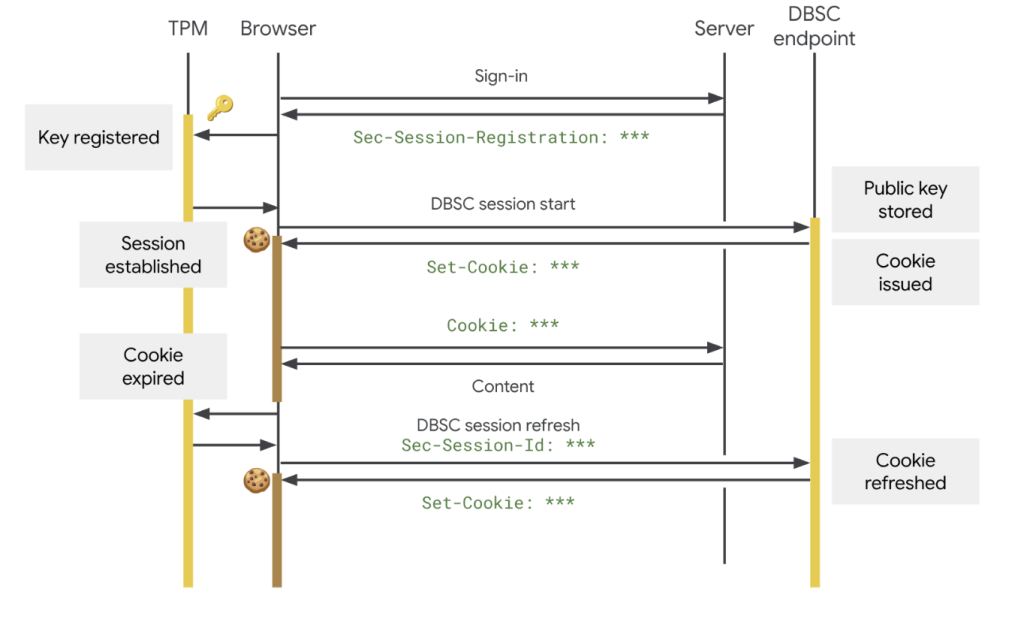
DBSC introduces a fundamental change to web security by inextricably linking an authentication session to a user’s specific physical device. The protocol leverages hardware-backed security modules, such as the Trusted Platform Module (TPM) found in Windows machines or the Secure Enclave present in Apple devices.
When a user logs in, the hardware generates a unique public-private key pair. Critically, the private key can never be exported from the device. Websites that upgrade their backend infrastructure to support DBSC issue short-lived cookies, requiring Chrome to continuously prove possession of the private key to refresh these credentials.
Should an attacker manage to steal the session cookies, these credentials quickly expire and become useless because the attacker lacks access to the victim’s physical hardware key. Web developers can integrate this functionality seamlessly, as the browser manages the intricate cryptographic processes in the background.
Despite its robust device-binding capabilities, DBSC was engineered with stringent privacy controls. The protocol utilizes a completely distinct key for each individual session. This design ensures that websites cannot exploit the technology to track users across different sites or correlate their browsing activities. Furthermore, DBSC only shares the minimal data necessary to prove possession, preventing its misuse for device fingerprinting.
Google developed DBSC as an open web standard in collaboration with the W3C Web Application Security Working Group, engaging closely with Microsoft and conducting trials on platforms such as Okta. Moving forward, Google intends to expand DBSC’s capabilities to secure federated identity and Single Sign-On (SSO) environments for enterprise clients.
The team is also actively developing advanced registration options to bind sessions to existing hardware security keys and exploring software-based key support to protect devices that lack dedicated physical security hardware.
What You Should Do
- Ensure your Chrome browser is updated to version 146 or later on Windows to benefit from DBSC.
- Encourage website administrators and developers to implement DBSC support on their platforms to enhance user security.
- Continue to practice good cybersecurity hygiene, including using strong, unique passwords and being wary of suspicious links or downloads.
Disclaimer: HackersRadar reports on cybersecurity threats and incidents for informational and awareness purposes only. We do not engage in hacking activities, data exfiltration, or the hosting or distribution of stolen or leaked information. All content is based on publicly available sources.









No Comment! Be the first one.