




Microsoft Warns of HPE Operations Agent Exploits in Malware-Free Attacks
Key Takeaways Microsoft has identified a sophisticated, “malware-free” attack campaign leveraging the legitimate HPE Operations Agent (OA) for covert network infiltration. Threat actors...

Key Takeaways
- Microsoft has identified a sophisticated, “malware-free” attack campaign leveraging the legitimate HPE Operations Agent (OA) for covert network infiltration.
- Threat actors gained initial access through a compromised third-party IT services provider and exploited trusted enterprise tools to move laterally, harvest credentials, and establish persistence.
- The attacks remained undetected for over 100 days, blending malicious activities with routine administrative tasks, emphasizing the evolving landscape of advanced persistent threats.
- No vulnerability in HPE OA itself was exploited; rather, the tool’s inherent trust and access privileges were weaponized.
- Defenders should focus on enhanced logging, EDR deployment, strict outbound traffic control, and continuous monitoring for unusual authentication changes to counter similar stealthy attacks.
Microsoft Details Stealthy Attacks Using Trusted HPE Operations Agent
Microsoft has issued a critical alert regarding a sophisticated attack campaign where threat actors are weaponizing the HPE Operations Agent (OA), a widely used legitimate enterprise management tool. This calculated strategy allows adversaries to execute highly stealthy, malware-free intrusions, as revealed in a recent report by Microsoft’s security researchers titled “Microsoft Warns of Attackers Using Trusted HPE Operations Agent for Malware-Free Intrusions.”
Table Of Content
The attackers initiated their breach by compromising a third-party IT services provider. From this initial foothold, they meticulously navigated the victim’s network, utilizing tools and processes that were already sanctioned and operational within the environment. Crucially, no overt malware was deployed, and no immediate security alerts were triggered throughout the entire attack lifecycle, enabling prolonged undetected access.
Abusing HPE Operations Agent for Covert Operations
Microsoft Incident Response investigators meticulously analyzed the complete attack chain, publishing their findings on May 12, 2026. Their report details how the campaign systematically abused the HPE Operations Agent (OA) as its primary delivery and execution mechanism. As Microsoft stated in their report, the abuse did not stem from any inherent flaw or vulnerability within HPE OA itself. Instead, the tool was weaponized precisely because it possessed legitimate and trusted access across the target environment, allowing malicious activities to appear as routine operations.
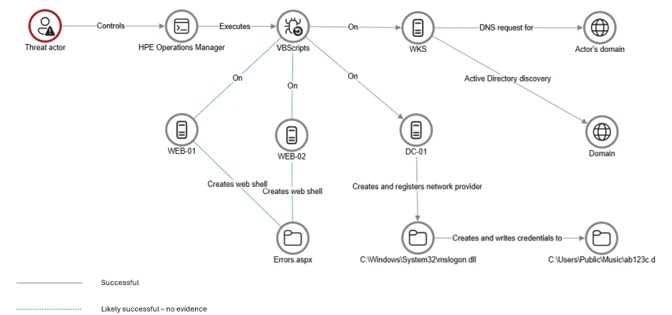
The campaign spanned more than 100 days, from the initial compromise to the point where incident response teams finally engaged. During this extensive period, the attackers successfully harvested credentials, moved laterally across critical systems including domain controllers and SQL servers, and established covert persistent access using tunneling tools like ngrok. The inherent trust placed in the HPE Operations Manager (HPOM), which was managed by a third-party IT services provider, was central to the attacker’s success.
Leveraging this trust, the threat actor pushed VBScripts, specifically a file named abc003.vbs, to numerous servers, including web servers and domain controllers throughout the network. These scripts performed reconnaissance, gathering system information, mapping the network topology, and conducting Active Directory discovery. Because these scripts were executed through an approved and signed management platform, they bypassed detection by conventional security tools.
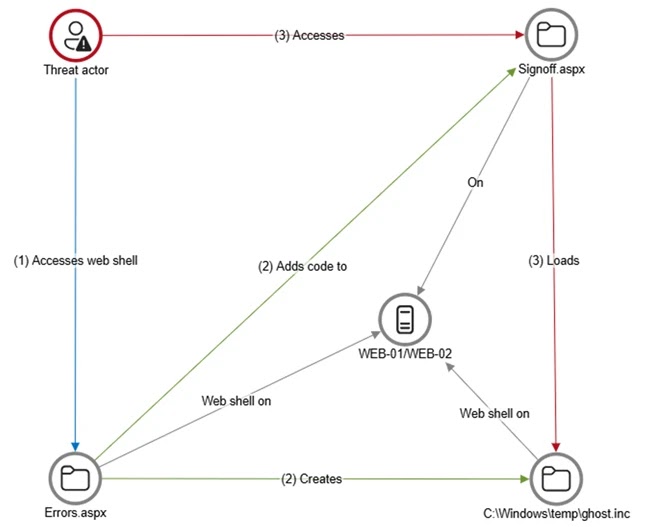
To ensure persistent access, the attackers also deployed web shells named Errors.aspx and a modified Signoff.aspx on internet-facing servers. These backdoors remained active even if other compromised tools or temporary implants were discovered and removed, providing a resilient foothold within the environment.
Credential Theft and Lateral Movement Tactics
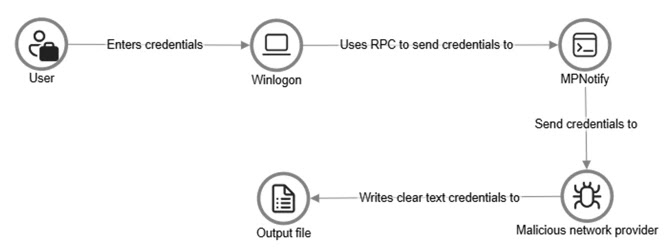
Once established, the attackers pivoted to credential theft. They registered a malicious network provider DLL, mslogon.dll, on domain controllers. This DLL hooked into the Windows authentication process, capturing usernames and passwords in plaintext whenever a user signed in or changed their password. The stolen credentials were discreetly saved to a file path within a public music folder (C:UsersPublicMusicabc123c.d), a location designed to avoid suspicion.
Later in the campaign, a password filter DLL named passms.dll was also registered on two domain controllers (DC01 and DC02). This module intercepted credentials at the system level during password modification events. A companion module, msupdate.dll, worked in tandem to transfer the captured, encoded credential data via a network file share (C:ProgramDataWindowsUpdateServiceUpdateDirIpd) and even exfiltrated it via email, using the subject line “Update Service.” The exfiltrated data was often disguised under file names like icon02.jpeg when written to remote SMB shares.
Furthermore, the attackers deployed ngrok on internal servers. This legitimate tunneling tool was abused to create encrypted tunnels, enabling Remote Desktop Protocol (RDP) sessions without the need to expose firewall ports, further enhancing their stealth and persistence.
The scale and patience demonstrated in this campaign underscore a significant evolution in advanced persistent threat tactics. Modern attackers are increasingly defined not by the complexity of their malware, but by their ability to integrate seamlessly into trusted environments and operate undetected for extended periods, blurring the lines between legitimate activity and malicious intent.
What You Should Do
- Deploy EDR Across All Devices: Implement robust Endpoint Detection and Response (EDR) solutions on all endpoints to gain deep visibility into system activities and detect anomalous behaviors that might indicate abuse of legitimate tools.
- Implement a Default-Deny Outbound Traffic Model: Configure firewalls and network security groups to block all outbound connections by default, allowing only explicitly approved traffic. This helps prevent unauthorized data exfiltration and command-and-control communications.
- Enable Detailed Logging on Web Servers: Ensure comprehensive logging is enabled for all web server activities, including access logs, error logs, and application logs. Regularly review these logs for unusual requests, suspicious file modifications (e.g., web shell deployments), or unexpected process executions.
- Remove Unnecessary Tools and Software: Conduct regular audits to identify and remove any unneeded enterprise management tools or software from critical systems. Minimizing the attack surface reduces opportunities for adversaries to weaponize legitimate applications.
- Actively Monitor Authentication Configurations: Continuously monitor for unexpected changes in authentication configurations, such as modifications to LSA (Local Security Authority) notification packages or network provider registrations. These can indicate attempts to install credential-stealing modules like
mslogon.dllorpassms.dll. - Review Third-Party Access and Privileges: Regularly audit and limit the access and privileges granted to third-party IT service providers. Ensure least privilege principles are applied to all external entities.
Indicators of Compromise (IoCs):-
| Type | Indicator | Description |
|---|---|---|
| File Name | abc003.vbs | VBScript deployed via HPE Operations Manager for system, network, and AD discovery |
| File Name | Errors.aspx | Initial web shell deployed on internet-facing web servers WEB-01 and WEB-02 |
| File Name | Signoff.aspx | Legitimate application page modified to load a secondary web shell |
| File Name | ghost.inc | Secondary web shell loaded from the Windows temporary directory |
| File Name | mslogon.dll | Malicious network provider DLL registered on domain controllers to capture plaintext credentials |
| File Name | passms.dll | Malicious password filter DLL registered on DC01 and DC02 to intercept credentials during password changes |
| File Name | msupdate.dll | Companion module that transferred encoded credential data via SMB and email exfiltration |
| File Path | C:UsersPublicMusicabc123c.d | File path where cleartext credentials captured by mslogon.dll were stored |
| File Path | C:ProgramDataWindowsUpdateServiceUpdateDirIpd | File path where encoded credential data captured by passms.dll was written |
| File Name | icon02.jpeg | File name used to disguise exfiltrated credential data written to remote SMB shares |
| Tool | ngrok | Legitimate tunneling tool abused to expose internal servers via encrypted RDP tunnels |
| Email Subject | Update Service | Subject line used by msupdate.dll for outbound credential exfiltration via SMTP |
Note: IP addresses and domains are intentionally defanged (e.g., [.]) to prevent accidental resolution or hyperlinking. Re-fang only within controlled threat intelligence platforms such as MISP, VirusTotal, or your SIEM.
Disclaimer: HackersRadar reports on cybersecurity threats and incidents for informational and awareness purposes only. We do not engage in hacking activities, data exfiltration, or the hosting or distribution of stolen or leaked information. All content is based on publicly available sources.









No Comment! Be the first one.