




Microsoft Entra Agent Logs Expose Assistive Agent Vulnerabilities
Key Takeaways Security researchers have uncovered a new class of vulnerabilities in Microsoft Entra ID logs related to “assistive agents.” These AI-powered agents, operating with...

Key Takeaways
- Security researchers have uncovered a new class of vulnerabilities in Microsoft Entra ID logs related to “assistive agents.”
- These AI-powered agents, operating with delegated user permissions, can be exploited to send malicious emails from legitimate employee accounts, bypassing conventional security monitoring.
- The attack leverages the “On Behalf of” flow, allowing agents to act as trusted users, making detection challenging without multi-log correlation.
- Defenders must correlate data from Purview Exchange, Microsoft Graph Activity, and non-interactive user sign-in logs to identify suspicious agent behavior.
Unmasking Assistive Agent Vulnerabilities in Microsoft Entra ID
Artificial intelligence (AI) agents are rapidly integrating into enterprise environments, moving beyond simple automation to perform complex tasks within platforms like Microsoft 365. However, this evolution introduces new security blind spots, as highlighted by recent findings detailed in a comprehensive investigation. Specifically, a new investigation reveals how Microsoft Entra Agent ID logs can expose suspicious activities by these “assistive” or “interactive” agents.
Table Of Content
Assistive agents are designed to streamline operations by executing tasks on behalf of users through conversational interfaces. These tasks can range from managing emails and calendar events to providing customer support, often requiring minimal human intervention. Crucially, these agents operate via a delegated access flow, meaning they inherit the permissions of the actual user, rather than utilizing their own distinct credentials. This method of operation, while efficient, presents a significant security challenge: if compromised or misused, these agents can perform malicious actions, masquerading as legitimate employees and bypassing traditional security controls.
Researchers at Red Canary documented this vulnerability, illustrating how an attack could unfold within a live Microsoft 365 environment. Their report, shared with Cyber Security News (CSN), detailed a scenario where an AI agent dispatched a suspicious email from a legitimate user’s account. This activity went undetected by standard identity monitoring tools, underscoring a critical gap in current enterprise security visibility.
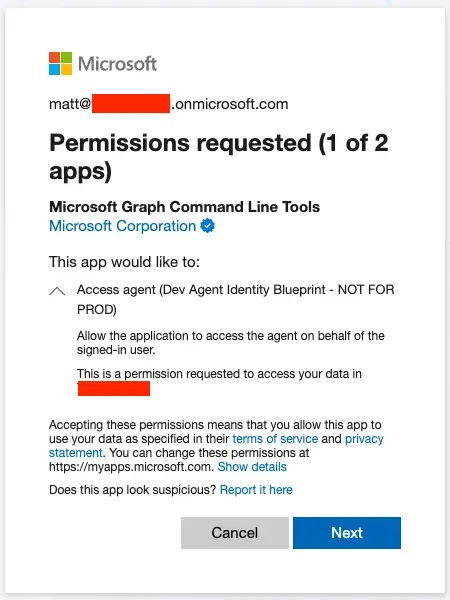
The core of the issue lies in the “On Behalf of” flow. When a user grants consent, the agent receives an access token endowed with the user’s permissions. This enables the agent to interact with Microsoft services such as Exchange or the Graph API. The permissions an agent acquires are a combination of what the agent is configured to do and the privileges already held by the consenting user.
In the observed incident, an email with the subject “Here is your invoice” was sent to an external CFO-level contact. The message appeared to originate from a regular employee. However, a deeper analysis of the logs revealed that an agent identified as Agent001, operating through the Microsoft Graph API, was the actual sender, acting silently on behalf of the user account.
Microsoft Entra Agent ID Logs: A Deeper Dive
Detecting such covert activities demands a sophisticated approach, requiring the correlation of data from multiple log sources. The Red Canary investigation specifically highlighted the need to analyze the Purview Exchange log, the Microsoft Graph Activity Log, and the non-interactive user sign-in log.
Initially, the Purview log indicated a Microsoft-owned IP address (40.126.23.26) as the source, a detail that could easily lead security analysts astray. However, by cross-referencing this information with the corresponding Graph API log using the AppAccessContext.UniqueTokenId field, researchers were able to uncover the true originating IP address, 51.3.97.221, and the precise API call that initiated the email.
The non-interactive user sign-in log confirmed the agent’s operation through an “On Behalf of” flow. Key indicators in this log were the fields Agent.agentType set to agenticAppInstance and Agent.agentSubjectType set to notAgentic. Microsoft does not explicitly label these distinct authentication flows in its logs, meaning that security teams must possess prior knowledge of how each authentication type manifests to recognize these patterns. The research team emphasized that replicating these scenarios in controlled test environments is crucial for defenders to understand these behavioral nuances.
Detecting Agentic Flows Before Damage Is Done
A critical lesson from this research is that relying on a single log source is insufficient for understanding the full scope of an AI agent’s actions. A holistic view, achieved through the correlation of Purview, Graph Activity Logs, and sign-in logs, is indispensable for constructing an accurate picture of agent behavior.
Security teams should proactively monitor the Add delegated permission grant operation within the AuditLogs table. This event signals when a user consents to grant an agent access through the access_agent scope, providing the earliest possible indication of potential malicious activity.
Additionally, tracking the Agent.parentAppId field in sign-in logs is vital. This field links an agent instance back to its original blueprint, enabling security personnel to trace suspicious actions to the agent’s core identity. It is imperative to remember that even seemingly low-level permissions, such as Mail.Send, can be weaponized to cause significant harm if misused. Therefore, developing detection rules for unexpected outbound emails originating from the Graph API is a practical and essential first step in identifying and mitigating malicious agent behavior.
What You Should Do
- Implement Multi-Log Correlation: Do not rely on a single log source. Correlate data from Purview Exchange logs, Microsoft Graph Activity logs, and non-interactive user sign-in logs for a comprehensive view of agent activities.
- Monitor for Delegated Permission Grants: Actively track the
Add delegated permission grantoperation in theAuditLogstable, specifically looking for theaccess_agentscope. This is the earliest indicator of an agent gaining access. - Track Agent Lineage: Utilize the
Agent.parentAppIdfield in sign-in logs to connect agent instances to their original blueprints, aiding in the investigation of suspicious actions. - Establish Baselines for Agent Behavior: Understand what “normal” agent behavior looks like in your environment. Replicate agent scenarios in test environments to recognize the unique log patterns associated with legitimate and potentially malicious “On Behalf of” flows.
- Develop Detections for Unexpected Email Activity: Create alerts for unusual outbound emails sent via the Microsoft Graph API, even those with seemingly benign permissions like
Mail.Send. - Review Agent Permissions Regularly: Periodically audit the permissions granted to all assistive agents within your Microsoft Entra ID environment to ensure they adhere to the principle of least privilege.
Disclaimer: HackersRadar reports on cybersecurity threats and incidents for informational and awareness purposes only. We do not engage in hacking activities, data exfiltration, or the hosting or distribution of stolen or leaked information. All content is based on publicly available sources.








No Comment! Be the first one.