




Microsoft Defender Bug Falsely Flags DigiCert Root Certificates as Malware
Key Takeaways Microsoft Defender’s anti-malware update incorrectly flagged two widely used DigiCert root certificates as malware. The false positive, identified as...

Key Takeaways
- Microsoft Defender’s anti-malware update incorrectly flagged two widely used DigiCert root certificates as malware.
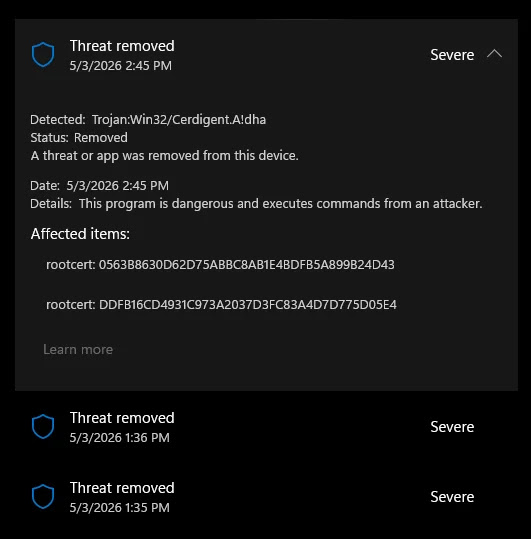
- The false positive, identified as “Trojan:Win32/Cerdigent.A!dha,” led to the certificates being quarantined from the Windows trust store.
- This action severely disrupted SSL/TLS validation and code-signing, causing potential service outages and application failures across global enterprise environments.
- Microsoft swiftly released corrective definition updates, with version .430 cited as restoring the quarantined certificates.
Microsoft Defender Falsely Flags Essential DigiCert Certificates as Malware
A recent update to Microsoft Defender’s security definitions triggered widespread false positive alerts, mistakenly identifying two critical DigiCert root certificates as malicious threats. This error, which occurred around April 30, 2026, had the potential to severely disrupt SSL/TLS validation and code-signing operations across enterprise networks globally.
Table Of Content
The faulty anti-malware signature update introduced a detection labeled “Trojan:Win32/Cerdigent.A!dha.” This detection incorrectly targeted registry entries associated with the DigiCert Assured ID Root CA (thumbprint: 0563B8630D62D75ABBC8AB1E4BDFB5A899B24D43) and DigiCert Trusted Root G4 (thumbprint: DDFB16CD4931C973A2037D3FC83A4D7D775D05E4), both foundational components of internet trust infrastructure.
Impact on Enterprise Systems
These essential certificates reside within the Windows trust store, specifically under the registry path HKLMSOFTWAREMicrosoftSystemCertificatesAuthRootCertificates, where Windows manages trusted root and intermediate certificate authorities. Upon detecting the supposed “malware,” Microsoft Defender automatically quarantined the flagged entries, effectively removing them from the trust store.
The removal of these root certificates created a critical vulnerability. Systems could no longer properly validate SSL/TLS connections for websites, leading to browser warnings and failures to access secure sites. Furthermore, legitimate software relying on code-signing verification could also cease to function correctly. This scenario posed a significant risk of cascading service disruptions and application failures across organizations, particularly those heavily reliant on DigiCert-signed software or HTTPS endpoints.
Cybersecurity researcher Florian Roth (@cyb3rops) was instrumental in bringing this issue to public attention. Roth quickly shared insights on X, urging the security community to investigate and providing practical tools for administrators.
Roth offered an Advanced Hunting query to assist administrators in verifying if the DigiCert certificates had been restored on affected devices:
| where ActionType == "RegistryKeyCreated"
| where Timestamp > datetime(2026-05-03T04:00:00)
| project Timestamp, DeviceName, ActionType, InitiatingProcessFileName
| order by Timestamp desc
He also suggested a simple command-line check for affected systems: certutil -store AuthRoot | findstr -i "digicert".
Reports from administrators quickly surfaced on Microsoft’s Q&A forums, confirming the widespread nature of the false positive. Users noted that the certificate hashes matched official values published by DigiCert, ruling out any actual compromise.
Microsoft’s Response and Remediation
Microsoft acknowledged the problem and rapidly deployed corrective definition updates. Version .430 was specifically noted as a key fix that initiated the restoration of the quarantined certificates on impacted machines.
Security observers noted that the restoration process appeared to be rolling out automatically across managed endpoints, suggesting that Microsoft implemented a silent remediation alongside the corrected signature update. However, administrators in environments with strict update policies were advised to manually confirm the presence of the certificates using certutil and to review Advanced Hunting logs within Microsoft Defender for Endpoint to ensure full restoration.
This incident underscores the inherent risks of automated threat remediation. While features like proactive quarantine are vital for protecting against certificate-store tampering—a known technique used by malware to intercept TLS traffic or bypass security checks—the same mechanism can inflict significant operational damage when triggered erroneously. The “Cerdigent” false positive serves as a critical reminder for security platforms to maintain stringent quality controls for signature releases, especially those targeting fundamental Windows infrastructure components such as the root certificate trust store.
What You Should Do
- Verify Certificate Presence: Use the command
certutil -store AuthRoot | findstr -i "digicert"on affected systems to confirm the DigiCert certificates have been restored. - Check Microsoft Defender for Endpoint Logs: Review Advanced Hunting logs in Microsoft Defender for Endpoint to confirm restoration events, especially if your environment has restricted update policies.
- Ensure Update Application: Confirm that your Microsoft Defender definitions are updated to version .430 or later to ensure the corrective fix has been applied.
- Monitor System Health: Continue to monitor critical applications and services for any lingering SSL/TLS or code-signing validation failures.
Disclaimer: HackersRadar reports on cybersecurity threats and incidents for informational and awareness purposes only. We do not engage in hacking activities, data exfiltration, or the hosting or distribution of stolen or leaked information. All content is based on publicly available sources.









No Comment! Be the first one.