




Opera’s New Paste Protect Blocks Clipboard Attacks, Including ClickFix
Key Takeaways Opera has launched Paste Protect, a new built-in security feature designed to block clipboard-based cyberattacks. The feature specifically targets sophisticated social engineering...

Key Takeaways
- Opera has launched Paste Protect, a new built-in security feature designed to block clipboard-based cyberattacks.
- The feature specifically targets sophisticated social engineering techniques like ClickFix, which trick users into executing malicious commands.
- Paste Protect operates by preventing unauthorized modification of copied content (Hijack Protection) and blocking malicious script injection into the clipboard (Injection Protection).
- Enabled by default within the Opera browser, it offers proactive defense against a rapidly growing threat, as ClickFix attacks constituted over 53% of malware loader activity in 2025.
Opera Bolsters Browser Security with New Clipboard Protection
Opera has unveiled “Paste Protect,” an innovative security feature seamlessly integrated into its browser, designed to safeguard users from an escalating wave of clipboard-centric cyberattacks. This new defense mechanism specifically targets threats such as the prevalent ClickFix technique, offering proactive protection right from the browser.
Table Of Content
The feature is a core component of the Opera browser, activated by default, ensuring immediate security without requiring any user configuration. This approach marks a significant step in addressing the increasing sophistication of attacks that leverage the clipboard to inject harmful content or substitute legitimate data with malicious alternatives.
The Rising Threat of Clipboard Attacks and ClickFix
Cybercriminals are increasingly exploiting the clipboard, a seemingly innocuous system component, to facilitate their attacks. These manipulations silently alter copied information, making it difficult for users to detect. The ClickFix variant, in particular, employs social engineering to persuade users into executing harmful commands on their own machines.
A typical ClickFix scenario unfolds when a user encounters a deceptive alert on a website. This alert might falsely indicate a CAPTCHA failure, a video playback error, or a system warning. The malicious page then instructs the user to copy a provided command and paste it into their system’s terminal, ostensibly to “fix” the problem. However, executing this command surreptitiously installs malware, steals credentials, or grants attackers unauthorized remote access to the user’s system.
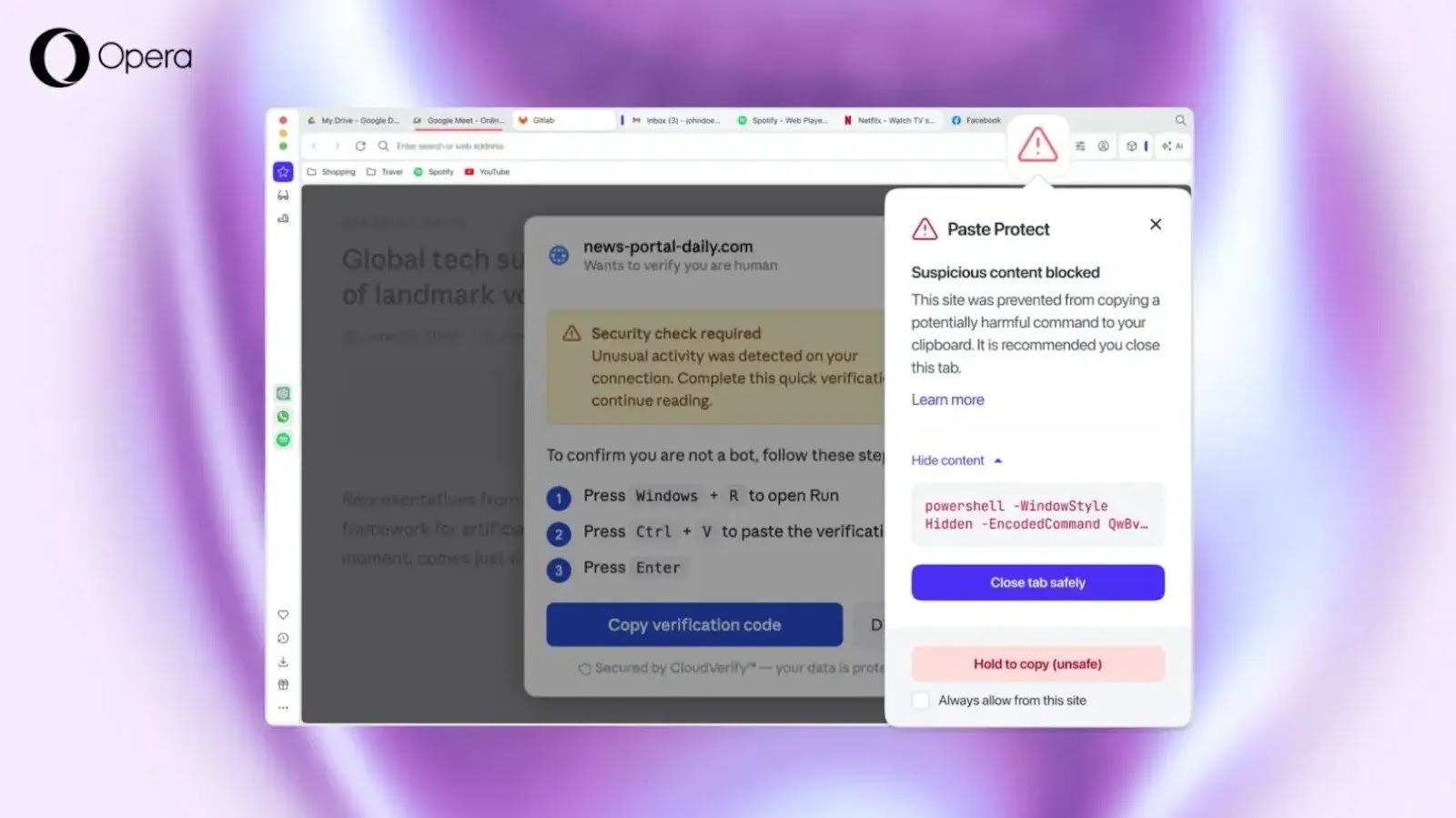
The severity of this threat is underscored by data from Huntress’ 2026 Cyber Threat Report, which revealed that ClickFix attacks were responsible for over 53% of malware loader activity throughout 2025, highlighting the rapid proliferation and effectiveness of this technique among cybercriminals.
How Opera’s Paste Protect Works
Opera’s Paste Protect integrates two core protective components:
- Hijack Protection: This component actively prevents unauthorized alterations to content copied by the user. For instance, it can detect and block scenarios where legitimate data, such as a cryptocurrency wallet address or bank account number, is surreptitiously replaced with an attacker-controlled value during the copy-paste process.
- Injection Protection: This new capability specifically targets and blocks malicious commands from being copied to the clipboard, a primary vector for ClickFix and similar attacks.
Injection Protection continuously monitors clipboard activity. When a website or user attempts to copy potentially harmful commands, the browser analyzes the content using platform-specific detection methods tailored for Windows, macOS, and Linux. Should a suspicious command be identified, the action is immediately blocked. Opera then displays a prominent warning popup and indicates a security alert in the browser’s address bar. Users are given the option to review a truncated preview of the blocked content (up to 120 characters) before deciding whether to override the protection and proceed.
Consider a scenario where a user visits a compromised website displaying a fake error, prompting them to resolve a browser issue by copying and pasting a command into their system terminal. With Paste Protect active, Opera intercepts this malicious command before it ever reaches the clipboard. The browser blocks the action and issues a warning about the potentially harmful content, effectively neutralizing the attack chain before execution.
Unlike external extensions, Paste Protect is deeply integrated into the browser, serving as a foundational defense against clipboard-based threats. This feature is enabled by default and can be configured via the browser’s Settings > Privacy & Security menu. For advanced users, options exist to override protections using a “Hold to Copy” function or to whitelist trusted sites, such as developer platforms where copying scripts is a legitimate activity.
Opera introduced Paste Protect to address a critical gap in traditional security measures, which often struggle to detect clipboard-based attacks due to their reliance on user interaction. This browser-level defense ensures malicious commands are intercepted prior to execution. As threat actors continually refine their methods, features like Paste Protect signify a crucial shift towards proactive, user-centric security.
However, Opera emphasizes that users remain the ultimate safeguard. It is paramount to exercise caution and avoid copying and executing commands that are not fully understood or sourced from untrusted origins.
What You Should Do
- Ensure your Opera browser is updated to the latest version to benefit from Paste Protect.
- Be wary of websites that prompt you to copy and paste commands into your terminal, especially if they claim to fix “errors.”
- Always verify the source and content of any command before executing it, even if Paste Protect allows it.
- Regularly review your browser’s security settings and familiarize yourself with features like Paste Protect.
Disclaimer: HackersRadar reports on cybersecurity threats and incidents for informational and awareness purposes only. We do not engage in hacking activities, data exfiltration, or the hosting or distribution of stolen or leaked information. All content is based on publicly available sources.








No Comment! Be the first one.