




IronWorm Supply Chain Attack Steals Developer Secrets via Malicious npm Packages
Key Takeaways A sophisticated new malware campaign, dubbed IronWorm, is actively compromising developer systems through malicious npm packages. The Rust-based infostealer targets a wide array of...

Key Takeaways
- A sophisticated new malware campaign, dubbed IronWorm, is actively compromising developer systems through malicious npm packages.
- The Rust-based infostealer targets a wide array of sensitive data, including API keys, cloud credentials, and cryptocurrency wallet recovery phrases, with a specific focus on crypto and Web3 developers.
- IronWorm employs an eBPF-based rootkit for stealth and leverages compromised GitHub accounts and npm’s Trusted Publishing to self-replicate by injecting malicious code into new packages, creating a potent supply chain threat.
- Defenders must audit repositories for suspicious commits, rotate affected credentials, and unpublish malicious package versions immediately.
A new, highly advanced malware campaign, identified as IronWorm, is actively exploiting software development supply chains by distributing poisoned npm packages. This operation is designed to pilfer critical developer secrets, including authentication tokens, API keys, and cryptocurrency wallet recovery phrases, posing a significant risk to the integrity of software projects.
Table Of Content
The attack vector capitalizes on trusted developer workflows, establishing IronWorm as one of the most intricate supply-chain threats observed recently. The malware embeds itself within seemingly legitimate npm packages, which are then republished from compromised developer accounts. A hidden Linux binary is discreetly inserted into these packages. The moment a developer executes npm install, this binary automatically deploys without requiring any additional user interaction or approval.
According to security researchers at JFrog, IronWorm is a custom-built, Rust-based infostealer. It systematically scrapes sensitive information from developer machines, maintains persistence through a kernel-level rootkit, and communicates with its command-and-control (C2) infrastructure via the Tor network. The campaign was detected in the wild, primarily targeting software developers, with a notable emphasis on those involved in cryptocurrency and Web3 projects.
A distinctive feature of this threat is its aggressive self-replication mechanism. After successfully exfiltrating credentials, IronWorm exploits these stolen credentials to push backdated commits into the victim’s GitHub repositories. This action injects further malicious code into other packages, which are then published to the npm registry. This process allows the malware to propagate further by leveraging the victim’s own identity, creating a cascading effect across the development ecosystem.
The scale of this campaign is substantial. Researchers uncovered 57 backdated malicious commits spread across nine distinct GitHub organizations. To evade detection during routine code reviews, some of these commits were intentionally timestamped to appear years old, mimicking the timestamps of legitimate, prior commits within the repositories.
IronWorm Supply Chain Attack Uses Malicious npm Packages
IronWorm employs sophisticated obfuscation techniques to conceal its malicious binary within an obscure folder path that developers are unlikely to scrutinize. The binary itself is packed using a modified UPX tool, with its standard signature removed to thwart automated unpacking attempts. Once executed, the malware decrypts its internal strings iteratively, using a unique key for each decryption, significantly complicating reverse engineering efforts.
The malware’s credential theft capabilities are extensive and meticulously designed. It scans for 86 different environment variables associated with various cloud platforms, databases, CI/CD systems, source control tokens, and AI service API keys. Furthermore, it reads data from over 20 credential file paths on disk, including configuration files for popular cryptocurrency wallets and recently adopted authentication tools.
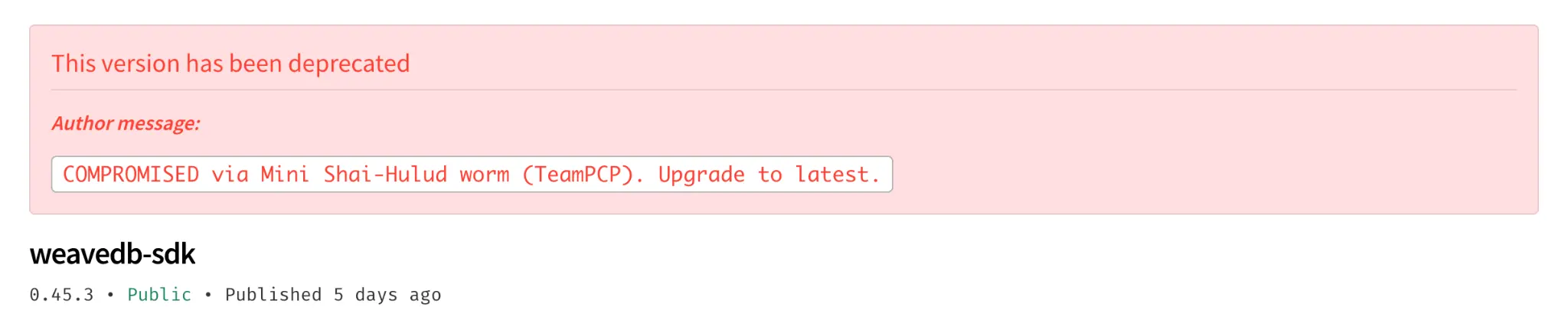
A dedicated module within IronWorm specifically targets the Exodus desktop wallet. This module injects code to capture the wallet password and recovery phrase the moment a user unlocks their wallet. Another module focuses on Kubernetes environments, extracting service account tokens and dumping any accessible secrets.
The Rootkit and Self-Replication Mechanism
IronWorm integrates an eBPF-based rootkit, enabling it to operate with exceptional stealth. This rootkit effectively masks its processes and network connections from conventional system monitoring tools. By operating at the kernel level, it rewrites process lists before monitoring software can observe them. Consequently, standard commands like ps and top yield clean results, while the malware continues to run undetected in the background. The rootkit also actively obstructs attempts to attach a debugger to the malware process, with such attempts potentially causing the shell running the command to crash.
The malware’s self-replication mechanism through npm is equally sophisticated. When IronWorm executes within a continuous integration (CI) environment, it exploits npm’s Trusted Publishing flow to acquire short-lived publish credentials. This method eliminates the need for persistently stored tokens. With these temporary credentials, it publishes a trojanized version of the package to the npm registry, mimicking a legitimate software release.
Researchers advise a comprehensive audit of all repositories to which a compromised account had write access. This audit should specifically look for backdated commits, unexpected build hooks, and any changes attributed to automation names such as dependabot or github-actions that appear outside their typical operational context. All API keys and secrets linked to affected accounts must be immediately rotated, and any identified malicious package versions should be unpublished with a clear security advisory issued to warn downstream users.
What You Should Do
- Audit Repositories: Scrutinize all GitHub repositories for suspicious backdated commits, unexpected build hooks, or unusual activity from automation accounts like
dependabotorgithub-actions. - Rotate Credentials: Immediately rotate all API keys, access tokens, and other sensitive credentials associated with any potentially compromised developer accounts.
- Unpublish Malicious Packages: If you are a package maintainer, unpublish any identified malicious versions of npm packages and issue a security advisory to inform downstream users.
- Implement Supply Chain Security: Adopt robust supply chain security practices, including integrity checks for downloaded packages, multi-factor authentication for developer accounts, and regular security audits of dependencies.
- Monitor for Anomalous Behavior: Enhance monitoring for unusual process activity, network connections (especially to Tor), and file system changes on developer workstations and CI/CD environments.
- Educate Developers: Ensure development teams are aware of the risks associated with supply chain attacks and the importance of verifying package authenticity.
Indicators of Compromise (IoCs):-
| Type | Indicator | Description |
|---|---|---|
| Commit Author Email | [email protected] | Fake author identity used for malicious backdated commits |
| npm Package | [email protected] | Malicious npm package (XRAY-989671) |
| npm Package | [email protected] | Malicious npm package (XRAY-989492) |
| npm Package | [email protected] | Malicious npm package (XRAY-989648) |
| npm Package | [email protected] | Malicious npm package (XRAY-989666) |
| npm Package | [email protected] | Malicious npm package (XRAY-989571) |
| npm Package | [email protected] | Malicious npm package (XRAY-989594) |
| npm Package | [email protected] | Malicious npm package (XRAY-989617) |
| npm Package | [email protected] | Malicious npm package (XRAY-989784) |
| npm Package | [email protected] | Malicious npm package (XRAY-989764) |
| npm Package | [email protected] | Malicious npm package (XRAY-989681) |
| npm Package | [email protected] | Malicious npm package (XRAY-989760) |
| npm Package | [email protected] | Malicious npm package (XRAY-989766) |
| npm Package | [email protected] | Malicious npm package (XRAY-989752) |
| npm Package | [email protected] | Malicious npm package (XRAY-989779) |
| npm Package | [email protected] | Malicious npm package (XRAY-989547) |
| npm Package | [email protected] | Malicious npm package (XRAY-989747) |
| npm Package | [email protected] | Malicious npm package (XRAY-989781) |
| npm Package | [email protected] | Malicious npm package (XRAY-989754) |
| npm Package | [email protected] | Malicious npm package (XRAY-989761) |
| npm Package | [email protected] | Malicious npm package (XRAY-989753) |
| npm Package | [email protected] | Malicious npm package (XRAY-989762) |
| npm Package | [email protected] | Malicious npm package (XRAY-989758) |
| npm Package | [email protected] | Malicious npm package (XRAY-989756) |
| npm Package | [email protected] | Malicious npm package (XRAY-989775) |
| npm Package | [email protected] | Malicious npm package (XRAY-989773) |
| npm Package | [email protected] | Malicious npm package (XRAY-989783) |
| npm Package | [email protected] | Malicious npm package (XRAY-989641) |
| npm Package | [email protected] | Malicious npm package (XRAY-989771) |
| npm Package | [email protected] | Malicious npm package (XRAY-989765) |
| npm Package | [email protected] | Malicious npm package (XRAY-989767) |
| npm Package | [email protected] | Malicious npm package (XRAY-989769) |
| npm Package | [email protected] | Malicious npm package (XRAY-989787) |
| npm Package | [email protected] | Malicious npm package (XRAY-989790) |
| npm Package | [email protected] | Malicious npm package (XRAY-989751) |
| npm Package | [email protected] | Malicious npm package (XRAY-989772) |
| npm Package | [email protected] | Malicious npm package (XRAY-989785) |
| npm Package | [email protected] | Malicious npm package (XRAY-989789) |
| Commit Message | fix: resolve lint warnings | Fake commit message used to blend in as routine maintenance |
| Commit Message | test: add missing edge cases | Fake commit message used to blend in as routine maintenance |
| Commit Message | ci: update workflow configuration | Fake commit message used to blend in as routine maintenance |
| Commit Message | fix: address review feedback | Fake commit message used to blend in as routine maintenance |
| Commit Message | docs: update contributing guide | Fake commit message used to blend in as routine maintenance |
| Commit Message | chore: sync lockfile | Fake commit message used to blend in as routine maintenance |
| Commit Message | fix: handle null pointer case | Fake commit message used to blend in as routine maintenance |
| Commit Message | build: bump patch version | Fake commit message used to blend in as routine maintenance |
| Commit Message | chore: update dependencies | Fake commit message used to blend in as routine maintenance |
| Crypto Wallet Address | 0x7e28D9889f414B06c19a22A9Bd316f0AC279a4d6 | Operator’s Ethereum wallet address derived from hardcoded recovery phrase |
| C2 Endpoint | /api/agent | Tor-based command and control endpoint used by IronWorm |
| File Path | tools/setup | Hidden malicious binary path inside infected npm packages |
Disclaimer: HackersRadar reports on cybersecurity threats and incidents for informational and awareness purposes only. We do not engage in hacking activities, data exfiltration, or the hosting or distribution of stolen or leaked information. All content is based on publicly available sources.









No Comment! Be the first one.