




CypherLoc Kit Exploits Browser Lock to Push Fake Microsoft Support Scams
Key Takeaways A new scareware kit, CypherLoc, is actively targeting web browsers to facilitate fake Microsoft technical support scams. The browser-locking attacks, which began spiking in early 2026,...

Key Takeaways
- A new scareware kit, CypherLoc, is actively targeting web browsers to facilitate fake Microsoft technical support scams.
- The browser-locking attacks, which began spiking in early 2026, have been linked to approximately 2.8 million incidents.
- CypherLoc employs sophisticated evasion techniques, including encrypted payloads and integrity checks, to bypass security tools and trap users.
- The kit utilizes aggressive browser controls, visual overlays, audio cues, and fake login forms to psychologically manipulate victims into contacting fraudulent support lines.
A sophisticated scareware toolkit, identified as CypherLoc, is aggressively exploiting web browsers to lock users into malicious pages and pressure them into calling fraudulent “Microsoft support” hotlines. This browser-locking tactic is a central component of a widespread technical support scam campaign, as detailed in a recent security analysis.
Table Of Content
Since the beginning of 2026, CypherLoc has been implicated in an estimated 2.8 million attacks, positioning it as one of the most prevalent browser-based threats observed this year. Unlike traditional malware, which often requires a file download and installation, CypherLoc operates entirely within the victim’s web browser, executing its malicious payload client-side.
Initial Infection Vector
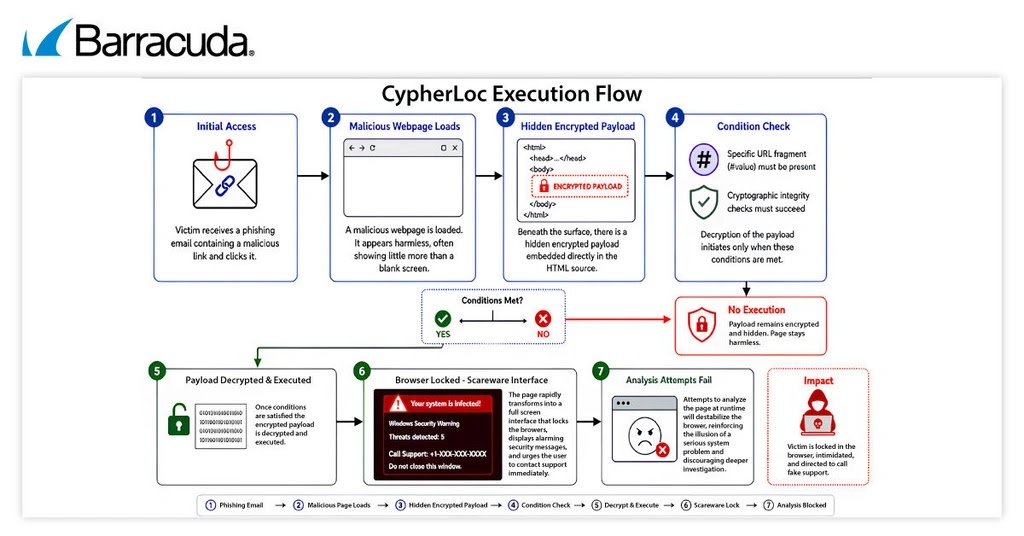
The attack typically commences with a phishing email that directs the victim to a malicious webpage via an embedded link or attachment. Initially, the landing page appears benign. However, over a short period, it progressively transforms into a full-screen scareware environment, designed to induce panic and prevent the user from navigating away.
Barracuda Research, the threat intelligence division of Barracuda, highlighted in a report shared with Cyber Security News, that CypherLoc combines advanced evasion methods, stringent browser controls, and psychological manipulation to coerce victims into contacting these fraudulent technical support numbers.
Barracuda researchers have been closely monitoring this kit since a surge in attacks earlier in 2026. A key characteristic distinguishing CypherLoc is its advanced stealth capabilities, making it particularly adept at avoiding detection by conventional security scanners.
Evasion Techniques
The malicious payload of CypherLoc is encrypted and embedded deep within the webpage’s code. It only activates when specific, predetermined conditions are met. If these conditions are not present, the page simply redirects to a blank screen, effectively concealing the threat from automated analysis tools and sandboxes.
Furthermore, CypherLoc actively thwarts investigative efforts. Should a user attempt to open the browser’s developer tools, the kit triggers a rapid succession of asset reloads and layout recalculations. This deluge of activity is designed to overwhelm analysis tools, leading to browser instability and the display of system error dialogues, further discouraging examination.
Browser-Locking CypherLoc Kit
Upon successful decryption and activation, CypherLoc seizes complete control of the web browser. It forces the browser into full-screen mode, disables right-click menus, hides the mouse cursor, and obscures the entire display with intimidating overlays. Any attempt by the user to regain control results in the page immediately re-locking, fostering a profound sense of helplessness and entrapment.
Beyond visual disruption, the kit incorporates auditory pressure. Persistent warning sounds are automatically triggered whenever the user clicks or the page reloads. This auditory chaos amplifies the perception of device malfunction, reinforcing the illusion of a severe system issue.
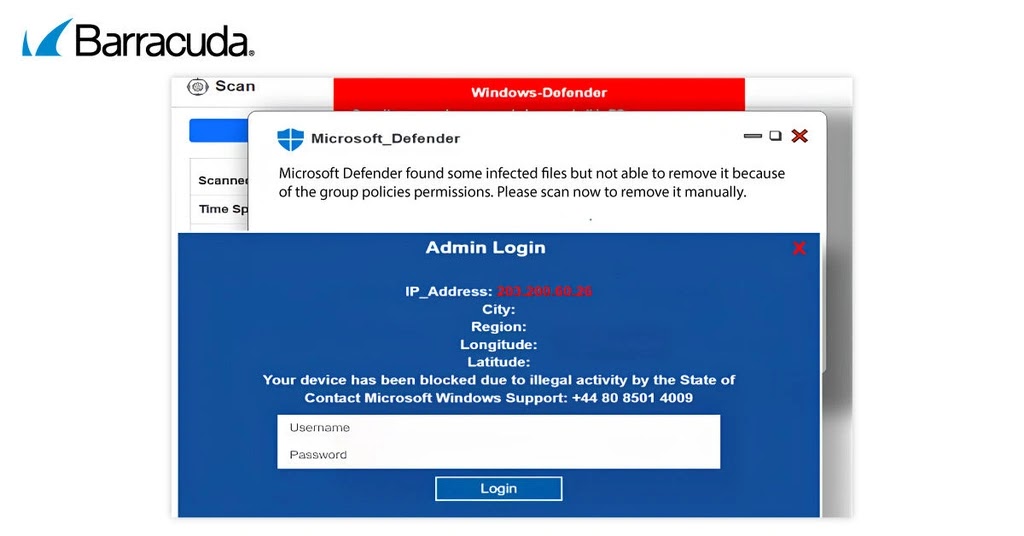
To enhance the psychological impact, CypherLoc dynamically retrieves and displays the victim’s public IP address on the scareware page. This personalization tactic is intended to make the urgent warnings appear more credible and directly targeted.
The malicious pages also present fake login forms, prompting victims to enter usernames and passwords. These forms are non-functional; their sole purpose is psychological. They lend an air of legitimacy to the threat, prolong the victim’s engagement with the page, and escalate panic when credential entry inevitably fails. A fraudulent phone number, presented as the exclusive solution, remains prominently displayed. When victims call, operators masquerading as Microsoft support personnel continue the scam through live interaction.
How CypherLoc Evades Detection
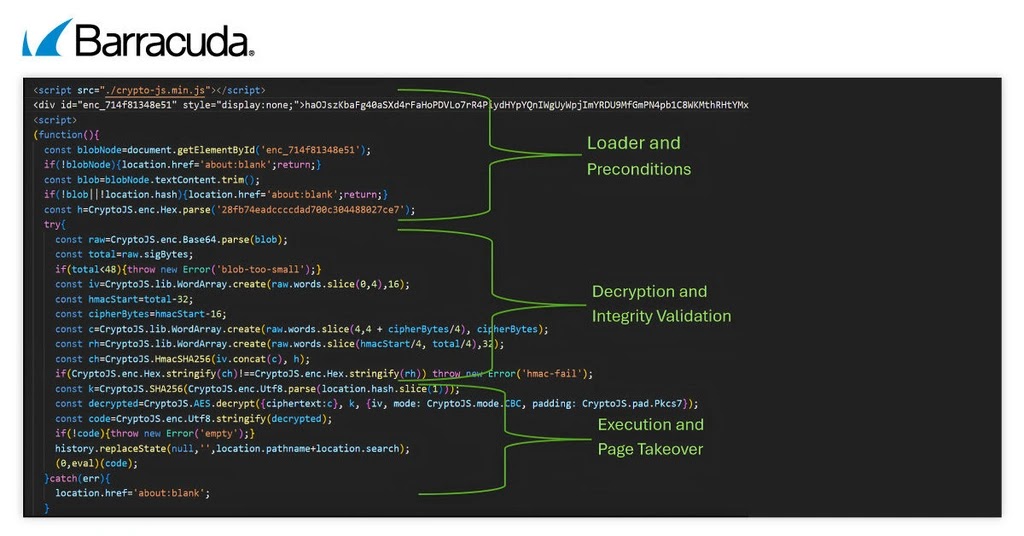
The technical sophistication underpinning CypherLoc distinguishes it from less advanced scareware. Its payload is encrypted using AES and only decrypts and executes if a specific value is present within the URL fragment. Before execution, the page also conducts a series of cryptographic integrity checks. If any check fails, the payload remains dormant, and the user observes no suspicious activity.
Following successful decryption, the original webpage content is entirely replaced with the new scareware interface. This abrupt content swap is designed to reset any live inspection scripts, making the page appear to have genuinely malfunctioned rather than being a deliberately crafted malicious environment.
As cybercriminals increasingly pivot from traditional malware to browser-based manipulation, organizations must prioritize defenses that protect individuals, not just infrastructure. CypherLoc serves as a stark reminder that fear itself can be a potent weapon in the arsenal of cyberattackers.
What You Should Do
- Implement robust anti-phishing solutions to detect and block malicious emails before they reach end-users.
- Ensure web browsers and operating systems are regularly updated to patch known vulnerabilities.
- Deploy advanced endpoint detection and response (EDR) solutions capable of identifying suspicious script behavior and browser anomalies.
- Educate users on the characteristics of legitimate security alerts (e.g., official support never locks your browser or demands immediate action via pop-ups and phone calls).
- Instruct users to close suspicious browser windows using task manager or by force-quitting the browser application, rather than interacting with the malicious page.
Disclaimer: HackersRadar reports on cybersecurity threats and incidents for informational and awareness purposes only. We do not engage in hacking activities, data exfiltration, or the hosting or distribution of stolen or leaked information. All content is based on publicly available sources.








No Comment! Be the first one.