




Xctdoor Backdoor Delivered via PowerShell, VBScript, and BAT Files
Key Takeaways A new cyberattack campaign is targeting corporate employees by distributing malicious LNK files disguised as resumes. The attack leverages a multi-stage infection chain involving...

Key Takeaways
- A new cyberattack campaign is targeting corporate employees by distributing malicious LNK files disguised as resumes.
- The attack leverages a multi-stage infection chain involving PowerShell, VBScript, and BAT files to deliver the Xctdoor backdoor.
- The Xctdoor backdoor establishes persistent access and communicates with a command-and-control (C2) server, enabling remote control over compromised systems.
- The method employs DLL Side-Loading with a legitimate Windows executable (
ProximityUxHost.exe) to evade detection. - Organizations, particularly departments handling external documents, face a heightened risk and should implement robust security measures and user education.
Cybersecurity researchers have uncovered a sophisticated campaign actively exploiting corporate employees through deceptive job application documents. This multi-layered attack chain is designed to bypass conventional security measures, ultimately deploying the stealthy Xctdoor backdoor on victim systems.
Table Of Content
The campaign initiates with malicious LNK files, meticulously crafted to appear as legitimate resumes. When an unsuspecting user opens one of these seemingly innocuous files, a complex infection process begins silently in the background, making detection challenging even for cautious individuals. The file displays a credible resume while simultaneously executing harmful scripts.
What makes this particular threat highly effective is its clever abuse of standard Windows scripting tools. Attackers orchestrate a coordinated effort using PowerShell, VBScript, and BAT files to implant and activate the Xctdoor backdoor. This sophisticated malware grants adversaries persistent, clandestine access to compromised machines, often remaining undetected by typical security solutions.
Researchers at ASEC, the security intelligence division of AhnLab, meticulously analyzed and documented this intricate attack methodology. Their report, shared with Cyber Security News (CSN), highlights the threat’s layered execution strategy, which involves creating multiple script files with randomized names within public system directories. This tactic significantly complicates efforts for security defenders to identify and neutralize the threat.
ASEC emphasized that this infection flow is considerably harder to detect compared to direct malware execution. Its effectiveness stems from a seamless blend of disguised malicious components with seemingly legitimate system behaviors. The attack is particularly potent against departments that routinely process external documents, such as human resources, sales, and customer support teams.
Given that resumes are a common element of daily professional workflows, the probability of a user opening a malicious file without suspicion is alarmingly high. Security teams within organizations that manage high volumes of documents face a substantial challenge in early detection and mitigation of this specific threat.
The Xctdoor backdoor is part of a malware family specifically engineered for long-term access to compromised systems. Upon successful deployment, it establishes communication with an external command and control (C2) server, granting threat actors the ability to execute remote commands at their discretion. Furthermore, the malware incorporates robust persistence mechanisms, ensuring that attacker access remains intact even after system reboots.
Hackers Abuse PowerShell, VBScript, and BAT Files
The moment a victim executes the malicious LNK file, a rapid chain reaction is triggered. The LNK file drops a series of batch files (.bat), PowerShell scripts (.ps1), and VBScript files (.vbs) into the C:UsersPublicVideos directory. These files are given randomly generated names to further obscure their malicious intent.
Subsequently, these scripts register a scheduled task named “Office365.” This task is configured to execute a VBScript file every ten minutes, thereby maintaining continuous malware activity and ensuring persistent access for the attackers. The use of a benign-sounding name like “Office365” is a tactic to blend in with legitimate system processes.
The PowerShell script plays a crucial role in the second stage of the attack, downloading additional malicious files from an external server using the curl command. Some of these downloaded files are Base64-encoded. Once decoded, they are saved as further PowerShell scripts within the C:UsersPublicPictures path.
A follow-up script, specifically named p2.ps1, then takes over. This script creates a startup shortcut to ensure persistence across reboots and decrypts the previously downloaded files. This decryption process yields an executable, a dynamic-link library (DLL) file, and supporting data files essential for the backdoor’s operation.
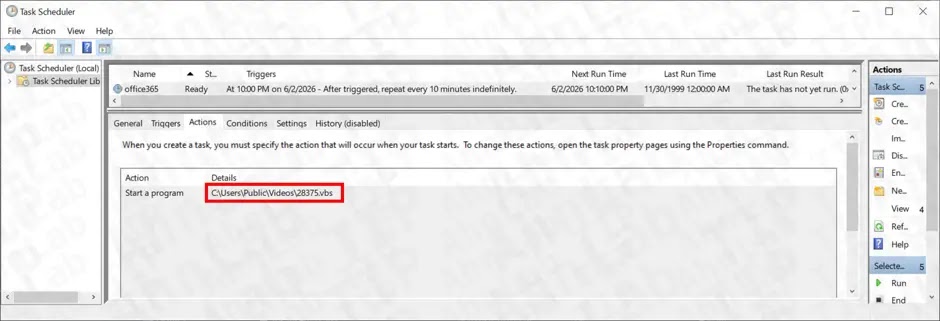
The attack then proceeds to abuse a legitimate Windows program, ProximityUxHost.exe. Through a technique known as DLL Side-Loading, the malicious ProximityCommon.dll is loaded alongside the authentic executable. This method allows the threat actors to execute their harmful code while making the activity appear as a normal system process, effectively bypassing many security checks. Once the malicious DLL is loaded, analysis confirmed that settings.dat, a component of the Xctdoor backdoor family, is injected into the legitimate ProximityUxHost.exe process.
DLL Side-Loading and the Xctdoor Backdoor
DLL Side-Loading is a stealthy technique where an attacker places a malicious DLL file in the same directory as a trusted, legitimate application. When the trusted application is launched, it inadvertently loads the malicious DLL, allowing the attacker’s code to run within the context of a trusted process. In this campaign, the Xctdoor backdoor leverages this method to integrate itself into a trusted Windows process without triggering overt security alerts.
Once activated, the Xctdoor backdoor establishes a connection to an external C2 server. This connection provides the threat actor with real-time, remote access to the victim’s environment, enabling further malicious activities, data exfiltration, or lateral movement within the network.
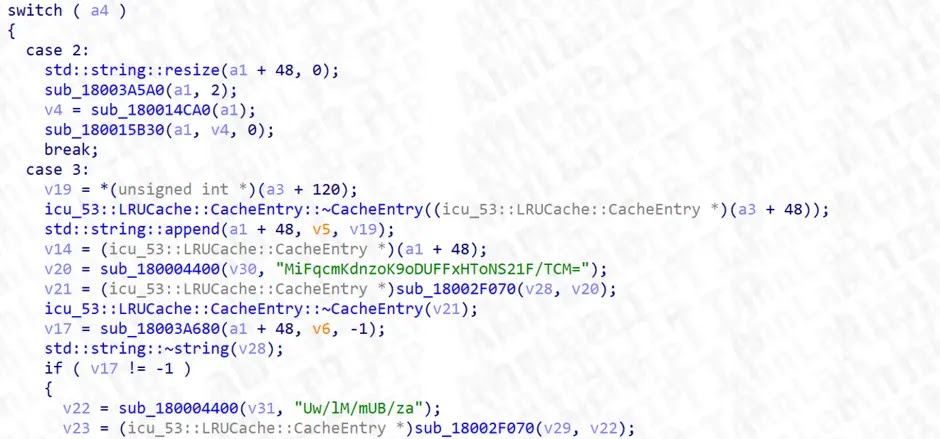
This multi-stage attack proves particularly difficult to detect due to its layered obfuscation. It combines fake documents, task names that mimic legitimate services (e.g., “Office365”), and scheduled scripts that blend seamlessly into normal system activity. Security teams must remain vigilant and proactively hunt for such threats.
What You Should Do
- Verify File Extensions and Origins: Always inspect the actual file extension and the source of any document, especially those from external or unexpected senders. Be wary of LNK files disguised as common document types.
- Educate Employees: Conduct regular cybersecurity awareness training, particularly for departments like HR, sales, and customer support that frequently handle external documents. Emphasize the risks associated with opening suspicious attachments.
- Monitor Task Scheduler: Regularly audit the Windows Task Scheduler for suspicious entries, especially those with generic or legitimate-sounding names like “Office365,” which could indicate persistence mechanisms. Remove any unauthorized or unknown tasks immediately.
- Implement Endpoint Detection and Response (EDR): Utilize EDR solutions to detect and respond to suspicious process chains, script executions, and DLL Side-Loading attempts that bypass traditional antivirus.
- Maintain Up-to-Date Threat Intelligence: Stay current with the latest threat intelligence reports, such as those from ASEC, to identify and block related Indicators of Compromise (IoCs) quickly.
- Remove Malicious Files: If discovered during a system check, promptly remove any identified malicious files from common public paths, including
C:UsersPublicVideos,C:UsersPublicPictures, andC:UsersPublicAppDataLocalPackagesMicrosoft.BingSearch365. - Network Segmentation and Least Privilege: Implement network segmentation to limit lateral movement if a system is compromised, and enforce the principle of least privilege to restrict the impact of an infected account.
Indicators of Compromise (IoCs):-
| Type | Indicator | Description |
|---|---|---|
| File Name | Malicious LNK file (resume-themed) | Initial infection vector disguised as a resume document |
| File Name | .bat files (random names) |
Batch scripts dropped in C:UsersPublicVideos |
| File Name | .ps1 files (random names) |
PowerShell scripts dropped in C:UsersPublicVideos and C:UsersPublicPictures |
| File Name | .vbs files (random names) |
VBScript files dropped in C:UsersPublicVideos |
| File Name | p2.ps1 |
PowerShell script responsible for decryption and DLL setup |
| File Name | ProximityUxHost.exe |
Legitimate executable abused via DLL Side-Loading |
| File Name | ProximityCommon.dll |
Malicious DLL loaded via Side-Loading technique |
| File Name | settings.dat |
Xctdoor family backdoor injected into legitimate process |
| File Name | Microsoft.Bing.lnk |
Shortcut file created in startup programs path |
| Registry / Task | Office365 (Task Scheduler name) |
Scheduled task registered for persistence, runs VBScript every 10 minutes |
| File Path | C:UsersPublicVideos |
Drop location for initial script files |
| File Path | C:UsersPublicPicturesp2.ps1 |
Location of decoded second-stage PowerShell script |
| File Path | C:UsersPublicAppDataLocalPackagesMicrosoft.BingSearch365 |
Path where malicious components may reside |
Note: IP addresses and domains are intentionally defanged (e.g., [.]) to prevent accidental resolution or hyperlinking. Re-fang only within controlled threat intelligence platforms such as MISP, VirusTotal, or your SIEM.
Disclaimer: HackersRadar reports on cybersecurity threats and incidents for informational and awareness purposes only. We do not engage in hacking activities, data exfiltration, or the hosting or distribution of stolen or leaked information. All content is based on publicly available sources.








No Comment! Be the first one.