




Fake Zoom Installer Delivers CloudSyncD Backdoor to macOS Users
Key Takeaways A new macOS backdoor, CloudSyncD, is being distributed via a deceptive Zoom installer. The malware tricks users into providing their administrator passwords, bypassing Gatekeeper...

Key Takeaways
- A new macOS backdoor, CloudSyncD, is being distributed via a deceptive Zoom installer.
- The malware tricks users into providing their administrator passwords, bypassing Gatekeeper protections.
- CloudSyncD establishes persistent communication with command-and-control (C2) servers and can download and execute additional payloads.
- Jamf Threat Labs researchers discovered the malware, noting its two-stage infection process and novel password exfiltration method.
- While no direct data exfiltration like browser history or crypto wallets was observed, the backdoor provides attackers with privileged remote access.
Fake Zoom Installer Tricks Mac Users
A sophisticated new backdoor dubbed CloudSyncD is actively targeting macOS users through a deceptive installer disguised as a legitimate Zoom application. This malware not only tricks users into divulging their login credentials but also establishes a persistent foothold on their systems, according to a recent analysis by Jamf said in a report.
Table Of Content
The initial sample of this threat emerged on September 15, 2026, still in its developmental stages. However, within just two days, researchers identified subsequent builds connected to active command and control (C2) servers across two distinct domains, signaling an imminent deployment. The full scope of infections, affected organizations, or confirmed data breaches remains undetermined at this time.
Jamf Threat Labs researchers uncovered CloudSyncD during their routine monitoring of executable files uploaded to VirusTotal. Their findings indicate a two-stage infection process where the backdoor payload is embedded directly within the installer, rather than being fetched separately post-execution.
The Deceptive Installation Process
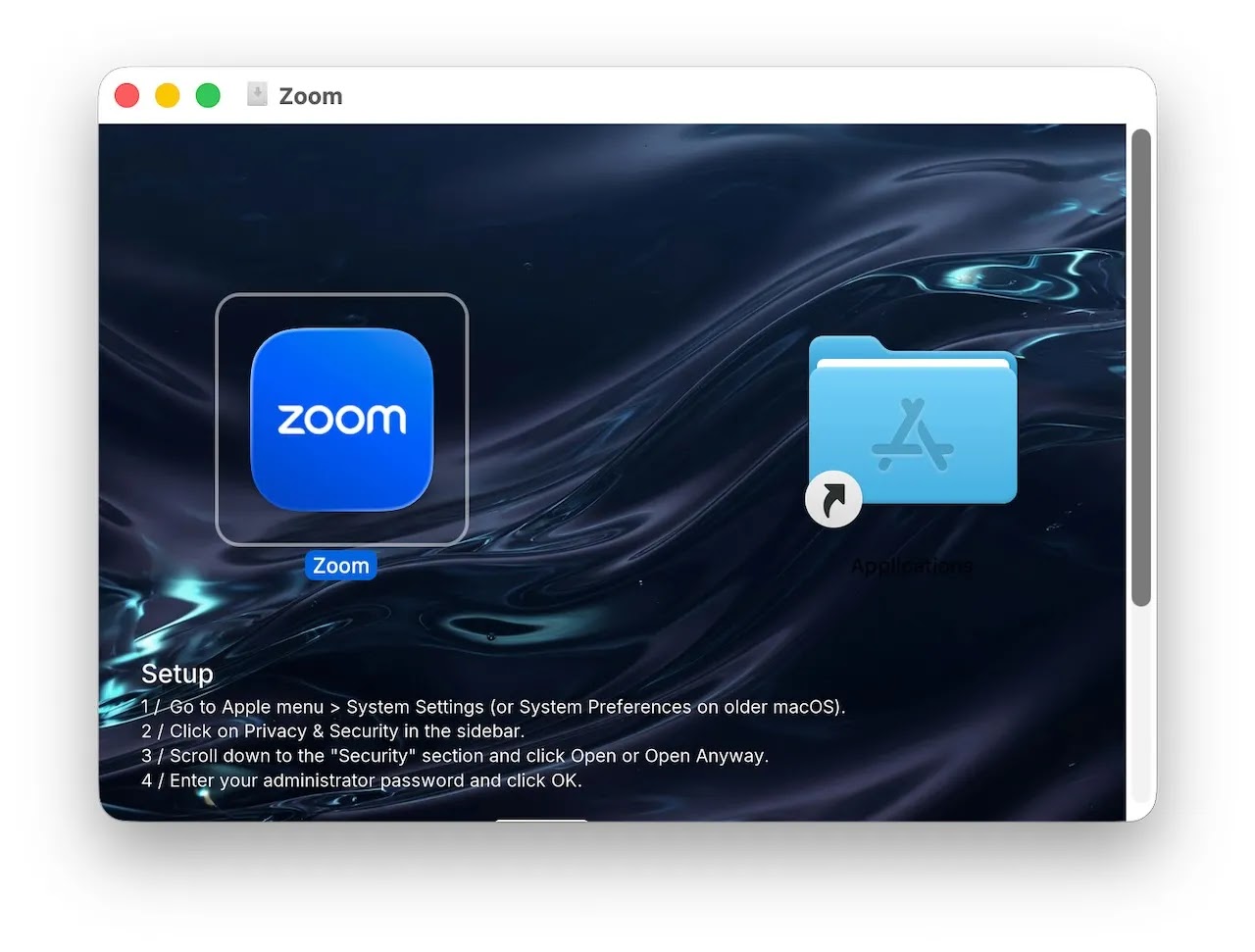
The malicious disk image, typically named Zoom.dmg, presents a highly convincing installation interface. It features a familiar application icon alongside an “Applications” shortcut. Crucially, the background of the installer displays step-by-step instructions that cunningly guide users to navigate to System Settings, then Privacy & Security, where they are prompted to click “Open Anyway” and input their administrator password. This social engineering tactic effectively bypasses macOS’s Gatekeeper security feature, as the application lacks a legitimate developer signature. This method mirrors other recent campaigns involving fake conferencing software updates that manipulate users into overriding security safeguards under the guise of legitimate software installation.
Upon launching the fake Zoom.app, a fabricated authorization dialog appears, requesting the user’s password. The installer validates this input against the local system and repeatedly prompts the user until successful authentication. A simulated download progress bar helps maintain the illusion of a standard software installation process.
The captured administrator password is then covertly stored within a seemingly innocuous settings file (data.json). Its base64-encoded value is embedded between random filler characters, with 48 invisible Unicode characters (U+200B and U+200C) appended to the version field to precisely mark its position and length. While the report details local storage of the password, it does not confirm any immediate transmission of this credential to the attackers.
Initially, the installer attempts to execute its embedded payload directly from memory, a method that failed during testing due to macOS security mechanisms. Consequently, it creates a temporary copy of the backdoor (cshelper) and leverages the previously captured password to launch it with elevated privileges.
Backdoor Awaits Additional Payloads
CloudSyncD is designed for broad compatibility, supporting both Apple Silicon and Intel-based Macs. Upon its initial connection, the backdoor conducts a comprehensive device survey, gathering details such as hardware specifications, operating system information, user and machine names, and network configurations. Subsequent check-ins with the C2 server transmit only the hardware identifier, with active beaconing observed every eight to sixteen seconds.
The C2 server has the capability to deliver encrypted tasks, which can include executable programs either directly or within compressed archives. This mechanism differs from a conventional remote shell, as researchers anticipate the launch of new binaries rather than arbitrary shell commands. This distinction emphasizes the importance of vigilant process monitoring when investigating suspected activity.
.webp)
The communication endpoints for CloudSyncD are designed to mimic requests for a JavaScript library, helping to camouflage the malicious traffic as ordinary web activity. Both stages of the malware accept any presented server certificate, highlighting a disregard for secure communication practices. Furthermore, the analyzed builds share encryption material, providing a valuable opportunity for defenders to correlate samples and decrypt captured communications.
Encrypted implant logs (sync.err) contain vital forensic data, including the contacted C2 server, device identifier, and check-in history. Researchers also noted that the password validation process exposes the user’s supplied credential in process arguments, creating a critical detection opportunity for security tools.
Notably, researchers did not observe any persistence mechanisms, a complete application replacement, or the delivery of remote tasks in the tested samples. Unlike other backdoor infections that establish startup mechanisms, these samples remained at their initial staging locations. This suggests that while a privileged backdoor is operational, not all intended functionalities may have been fully implemented or observed. Jamf recommends implementing robust endpoint and web protections to block and report similar threats.
What You Should Do
- Be Skeptical of Unsolicited Software: Always download applications directly from official vendor websites or the macOS App Store. Avoid installing software from third-party sites, email attachments, or pop-up advertisements.
- Verify Digital Signatures: Before installing any application, check its digital signature to ensure it comes from a trusted developer. macOS Gatekeeper will warn you about unsigned applications; heed these warnings.
- Exercise Caution with Password Prompts: Be extremely wary of any application installer that requests your administrator password outside of standard macOS system prompts. Always scrutinize the context and legitimacy of such requests.
- Enable and Maintain Security Software: Ensure your macOS device has reputable antivirus or endpoint detection and response (EDR) software installed and kept up-to-date.
- Monitor Network Traffic: For organizations, monitor network traffic for connections to suspicious domains like
orchid-led[.]comandbjzhishang[.]com, or unusual requests for JavaScript-like resources from unexpected IPs. - Review System Logs and Processes: Regularly review system logs for unusual process arguments, especially those involving password validation, and look for temporary files with patterns like
.app_swap_or.s_in the$TMPDIRdirectory. - Educate Users: Implement ongoing security awareness training to educate users about phishing, social engineering tactics, and the importance of verifying software sources.
Indicators of compromise (IoCs):-
Disclaimer: HackersRadar reports on cybersecurity threats and incidents for informational and awareness purposes only. We do not engage in hacking activities, data exfiltration, or the hosting or distribution of stolen or leaked information. All content is based on publicly available sources.







No Comment! Be the first one.