




Google Boosts Android Security with New AI-Powered Protections
Key Takeaways Google has rolled out new AI-powered security features for Android to combat evolving cyber threats. The updates introduce proactive, real-time app behavior monitoring and enhanced...

Key Takeaways
- Google has rolled out new AI-powered security features for Android to combat evolving cyber threats.
- The updates introduce proactive, real-time app behavior monitoring and enhanced protections against social engineering scams like caller ID spoofing.
- Key improvements include stricter device access controls for lost phones and increased user privacy over location data and one-time passwords.
- These features are designed to protect billions of Android users from financial fraud and data theft, with some capabilities rolling out to Android 6 and newer, and others specific to Android 16.
Android smartphones, used by billions globally, serve as central hubs for personal and financial activities, making them prime targets for cybercriminals. As attackers continuously refine their methods, often bypassing existing security measures, Google has responded by integrating advanced AI-driven defenses directly into the Android operating system. This strategic shift aims to provide more proactive and robust protection against a rapidly evolving threat landscape.
Table Of Content
The increasing sophistication of mobile threats, including deceptive banking applications, malicious software disguised as legitimate tools, and caller ID spoofing, has led to staggering financial losses worldwide, estimated in the hundreds of billions annually. These attacks often exploit user trust in established institutions, impacting everyday users as much as, if not more than, tech-savvy individuals.
Google’s Android Security and Privacy Team, under the leadership of Director Eugene Liderman, has been actively tracking these shifting attack patterns. Their analysis highlighted a significant rise in internet-based calling systems being used to spoof caller IDs, making fraudulent calls appear to originate from trusted entities like banks. This social engineering technique is a major driver of financial fraud across numerous countries.
In response, Google has implemented a comprehensive suite of AI-powered security features within Android. These enhancements range from real-time call monitoring to strengthened device protection for lost or stolen phones. Google states its ongoing commitment through 2026 is to further refine these intelligent defenses, making them more seamless and effective for all Android users. This initiative signifies a move towards constant, background-level protection, designed to prevent harm before it occurs, whether from a fraudulent call or a malicious application.
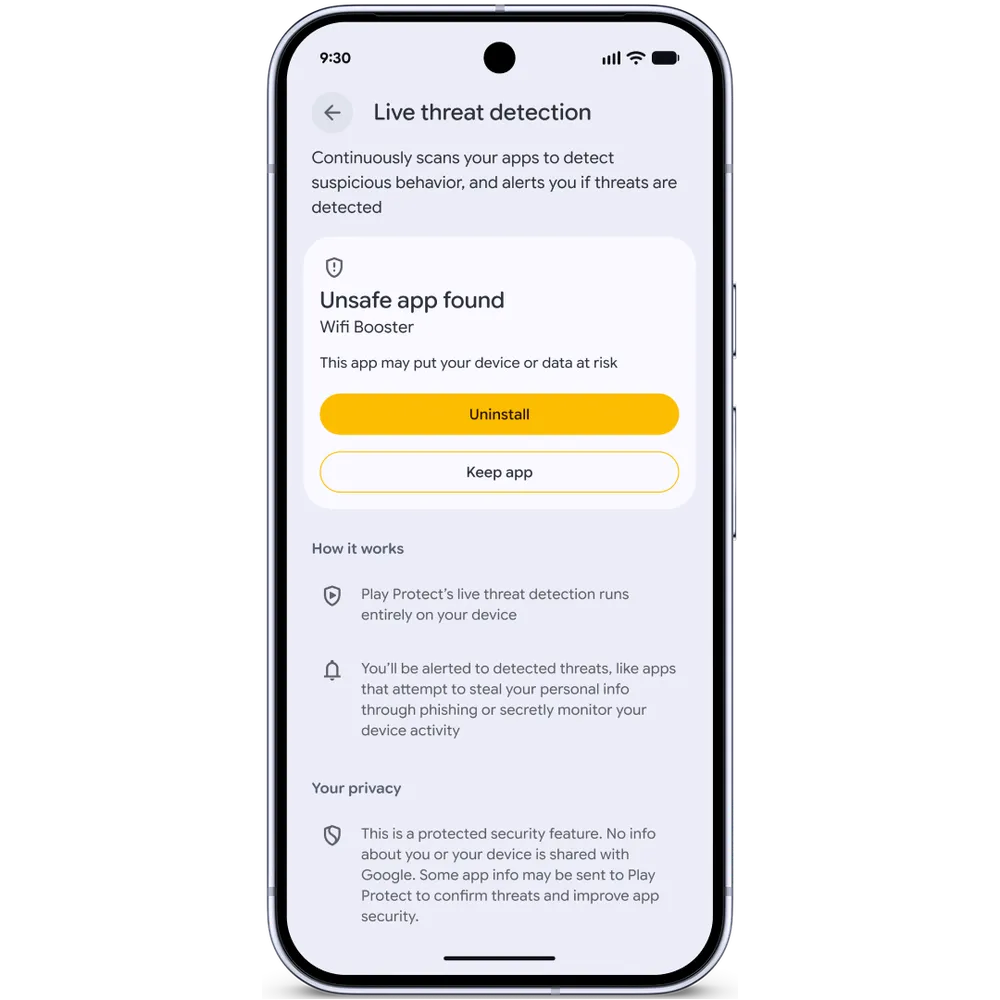
AI-Powered Threat Detection
A significant new addition is an enhanced Live Threat Detection system, which leverages on-device artificial intelligence to scrutinize app behavior. This system is designed to identify and alert users to suspicious activities in real-time by monitoring for known malicious patterns. Google is expanding its capabilities to detect a broader range of deceptive and harmful applications.
New warnings now specifically target behaviors such as unauthorized SMS forwarding, where an application covertly redirects text messages, and accessibility overlay abuse, where apps exploit permissions to display misleading content over legitimate interfaces. Additionally, dynamic signal monitoring is being introduced on Android 6 and newer devices. This feature continuously tracks how applications interact with the operating system, enabling early detection of abusive behaviors. For Chrome on Android, an added security layer now verifies an app’s package identifier against a malware database prior to download completion, preventing users from inadvertently installing malicious software.
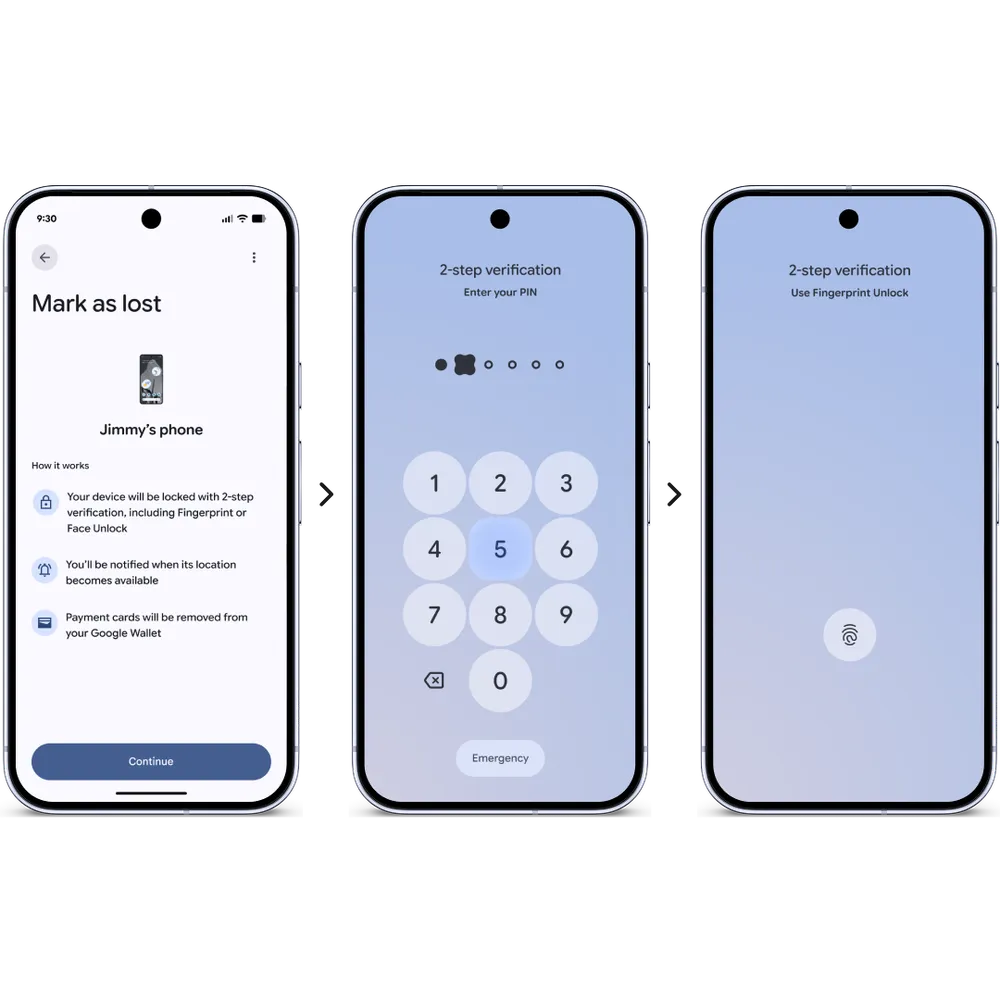
Stronger Device and Privacy Controls
Google is also bolstering protections for devices that are lost or stolen. The “Mark as Lost” feature within Find Hub is being upgraded in Android 16 to mandate biometric authentication for unlocking a reported lost device. This enhancement ensures that even if a thief obtains a user’s PIN or password, the phone remains inaccessible once marked as lost, effectively closing a previous vulnerability.
To enhance user control over location data, Android 16 will introduce a location button allowing temporary precise location sharing only while a specific app is in use. This eliminates the necessity of granting permanent location permissions for brief tasks. Furthermore, a new location indicator will appear at the top of the screen whenever an app accesses location data, mirroring the existing indicators for camera and microphone usage.
Android is also fortifying safeguards around one-time passwords (OTPs). Malicious applications with SMS permissions have historically been used by scammers to intercept and steal OTPs from text messages. To counter this, Android will now automatically conceal these sensitive security codes from most applications for a period of three hours, thereby protecting OTPs from unauthorized access during their active window.
What You Should Do
- Ensure your Android device is updated to the latest available operating system version to receive all new security features.
- Regularly review app permissions, especially for SMS and accessibility services, and revoke any unnecessary access.
- Enable biometric authentication (fingerprint, face unlock) on your device for enhanced security, particularly for the “Mark as Lost” feature.
- Be cautious of unsolicited calls or messages, especially those requesting personal or financial information, and verify the caller’s identity through official channels if suspicious.
- Utilize the new temporary location sharing feature in Android 16 to limit app access to your precise location only when necessary.
Disclaimer: HackersRadar reports on cybersecurity threats and incidents for informational and awareness purposes only. We do not engage in hacking activities, data exfiltration, or the hosting or distribution of stolen or leaked information. All content is based on publicly available sources.








No Comment! Be the first one.