




New Android Banking Malware Hijacks Accounts via Fake KYC and WhatsApp
Key Takeaways A new Android banking malware, dubbed KYCShadow, is actively targeting Indian bank customers. The malware uses a sophisticated two-stage dropper mechanism, delivered via WhatsApp, to...

Key Takeaways
- A new Android banking malware, dubbed KYCShadow, is actively targeting Indian bank customers.
- The malware uses a sophisticated two-stage dropper mechanism, delivered via WhatsApp, to trick users into installing a fake KYC verification application.
- KYCShadow harvests sensitive financial credentials, intercepts OTPs, and establishes a full-tunnel VPN to control device traffic, all while remaining hidden.
- No specific CVE IDs or patches are applicable as this is a malware campaign, not a vulnerability in a specific product.
A sophisticated new Android banking malware, identified as KYCShadow, is actively compromising the accounts of Indian banking customers. This threat leverages a meticulously designed fake Know Your Customer (KYC) verification process, distributed primarily through WhatsApp, to steal critical financial information.
Table Of Content
The malicious application masquerades as an official banking compliance tool, exploiting the familiarity of millions of Indian users with routine KYC procedures. Once installed, it systematically guides victims through convincing screens designed to harvest mobile numbers, ATM PINs, Aadhaar numbers, and card details. Following the submission of this data, a deceptive confirmation message falsely claims that “verification is in progress,” while all collected information is surreptitiously transmitted to an attacker-controlled server located at jsonapi[.]biz.
Researchers at Cyfirma first identified this campaign in April 2026. They noted that KYCShadow operates as a two-stage dropper. The initial application installed by victims functions as a loader, which then silently decrypts and deploys a secondary, more potent malicious payload in the background. This staged approach helps the attackers evade early detection by concealing the malware’s full capabilities during the initial installation phase.
Upon activation, the secondary payload aggressively requests extensive permissions, including SMS access, control over phone calls, and exemption from battery optimization. These permissions grant the malware the ability to intercept one-time passwords (OTPs) in real-time, remotely send and forward SMS messages, initiate phone calls without user consent, and maintain continuous operation even when the device is idle. Furthermore, the payload effectively hides its icon from the device’s app launcher, leaving no visible trace on the infected smartphone.
Compounding the threat, KYCShadow activates a full-tunnel VPN service. This reroutes all device network traffic through an attacker-controlled layer, enabling the threat actor to monitor, filter, or block outbound connections to security services. This capability significantly diminishes the infected device’s ability to detect or report the ongoing compromise.
Multi-Stage Infection Mechanism
The infection sequence begins immediately upon launching the initial dropper application. Users are presented with a convincing “Update Required” screen featuring a single “Install Update” button, designed to mimic a standard system prompt that most users would instinctively tap.
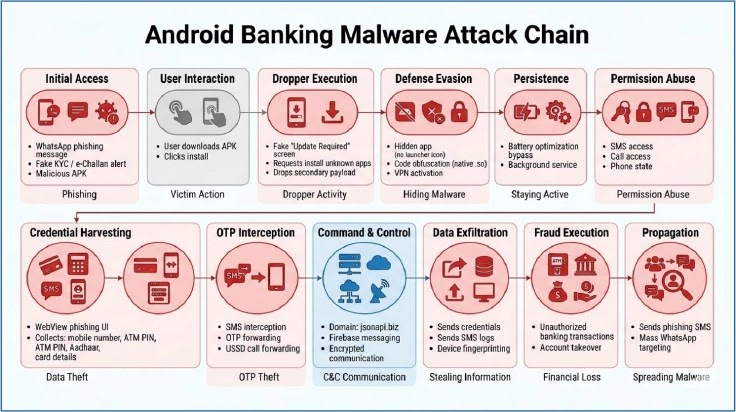
Tapping this button initiates a VPN connection request, followed by a prompt to allow the installation of applications from unknown sources. Once these critical approvals are granted, the dropper proceeds to decrypt an embedded payload. This decryption utilizes an XOR-based algorithm specifically tied to the dropper’s own package name, making the payload challenging to extract and analyze without precise knowledge of both the package name and the decryption logic. The decrypted file is then written to a temporary internal storage location and silently installed via Android’s PackageInstaller API, requiring no further user interaction.
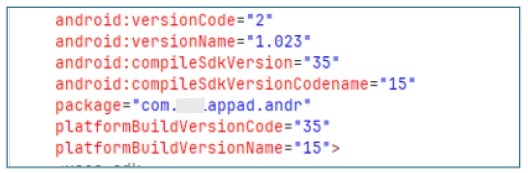
The secondary payload, identified with the package name com.am5maw3.android, launches in the background and immediately removes its launcher icon to maintain stealth. It then registers with Firebase Cloud Messaging, establishing a persistent, push-based remote command and control channel for the attacker.
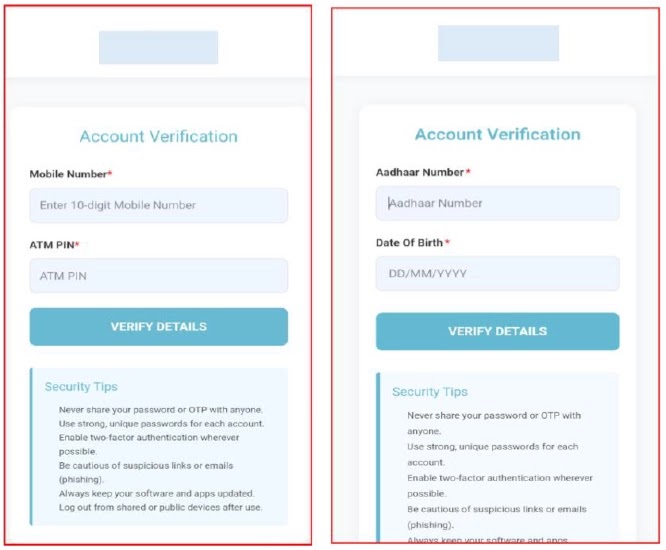
Through this channel, the attackers can execute a range of commands, including real-time SMS interception, bulk extraction of SMS messages, remote initiation of phone calls, and USSD-based call forwarding. All these malicious activities occur without any visible indication on the compromised device.
What You Should Do
- Avoid Unknown App Installations: Never install applications received via unofficial channels such as WhatsApp, SMS, or other messaging platforms, especially those claiming to be banking or KYC updates.
- Download from Official Sources Only: Always download banking and other sensitive applications exclusively from official app stores (Google Play Store) or your bank’s verified website.
- Disable “Install Unknown Apps”: Ensure that the “Install Unknown Apps” permission is disabled in your Android device settings. Re-enable it only if absolutely necessary and for a trusted source, then disable it immediately afterward.
- Verify Requests: Be highly suspicious of any unsolicited requests for personal or financial credentials. Banks will not ask for ATM PINs, Aadhaar numbers, or full card details through in-app prompts or unofficial messages.
- Monitor for Unusual Activity: Watch for unexpected VPN prompts, unfamiliar permission requests, or unusual SMS activity on your device. Report any suspicious behavior to your bank immediately.
- Network Blocking: Financial institutions and enterprise security teams should implement network-level blocks for traffic to command-and-control domains such as jsonapi[.]biz, jsonserv[.]biz, and jsonserv[.]xyz.
- Deploy Mobile Threat Defense: Organizations should leverage mobile threat defense (MTD) solutions capable of detecting staged dropper behavior, unauthorized permission escalation, and hidden application payloads to enhance their response capabilities against such campaigns.
Disclaimer: HackersRadar reports on cybersecurity threats and incidents for informational and awareness purposes only. We do not engage in hacking activities, data exfiltration, or the hosting or distribution of stolen or leaked information. All content is based on publicly available sources.









No Comment! Be the first one.