




Microsoft 365 Vulnerability Lets Attackers Intercept Business Emails
Key Takeaways Attackers are leveraging a built-in Microsoft 365 and Outlook feature, “mailbox rules,” to covertly intercept business emails. This tactic allows threat actors to forward...

Key Takeaways
- Attackers are leveraging a built-in Microsoft 365 and Outlook feature, “mailbox rules,” to covertly intercept business emails.
- This tactic allows threat actors to forward sensitive communications, suppress security alerts, and maintain persistence within compromised accounts.
- Proofpoint researchers identified this as a common post-exploitation technique, with approximately 40% of compromised Microsoft 365 accounts showing evidence of malicious rule creation.
- The technique is effective across various sectors and industries, posing a significant risk for Business Email Compromise (BEC) and other fraudulent activities.
Cybercriminals are employing a sophisticated, stealthy method to compromise corporate email accounts within Microsoft 365 environments, enabling them to silently monitor all incoming and outgoing communications. This technique exploits a standard platform feature known as mailbox rules, allowing attackers to remain undetected by account holders.
Table Of Content
Mailbox rules are a fundamental productivity tool in Microsoft 365 and Outlook, designed to help users automate email management, such as sorting, forwarding, or deleting messages. However, when an attacker gains unauthorized access to an account, these legitimate rules are weaponized into a persistent surveillance mechanism.
Once activated, a malicious rule operates discreetly in the background, processing every incoming email based on predefined conditions. This can include forwarding sensitive correspondence to external addresses controlled by the attacker, redirecting password reset notifications, or moving critical security alerts to obscure folders that the victim is unlikely to check.
Research conducted by Proofpoint’s Anna Akselevich, Pavel Asinovsky, and Yaniv Miron highlighted this technique as one of the most frequently observed post-exploitation behaviors following cloud-based account takeovers. Their analysis revealed that nearly 40% of compromised Microsoft 365 accounts exhibited at least one malicious mailbox rule created shortly after the initial breach. In some instances, the time between initial account compromise and the creation of a malicious rule was as short as eight seconds, underscoring the automated and deliberate nature of this attack vector.
Typically, attackers establish their initial foothold in Microsoft 365 environments through methods such as credential phishing, password spraying, or OAuth consent abuse. Instead of deploying traditional malware or setting up external command-and-control infrastructure, they rely on the cloud platform’s native features to maintain access and evade detection. This approach significantly complicates detection efforts, as all malicious activity occurs entirely within Microsoft’s ecosystem, utilizing legitimate functionalities rather than suspicious external tools.
The ramifications of this technique extend beyond individual accounts. From enabling Business Email Compromise (BEC) fraud to facilitating large-scale spam campaigns targeting institutions like universities, hidden mailbox rules allow attackers to operate within organizations for extended periods, often weeks or months, without being noticed. This method is effective across all industry sectors, capitalizing on the common oversight of users rarely reviewing their mailbox rule settings.
How Hidden Rules Operate Inside Compromised Accounts
Upon successfully compromising an account, attackers systematically create mailbox rules with short, generic, or nonsensical names. This naming convention is designed to prevent them from standing out during a casual review by a legitimate user, thus ensuring their stealth.
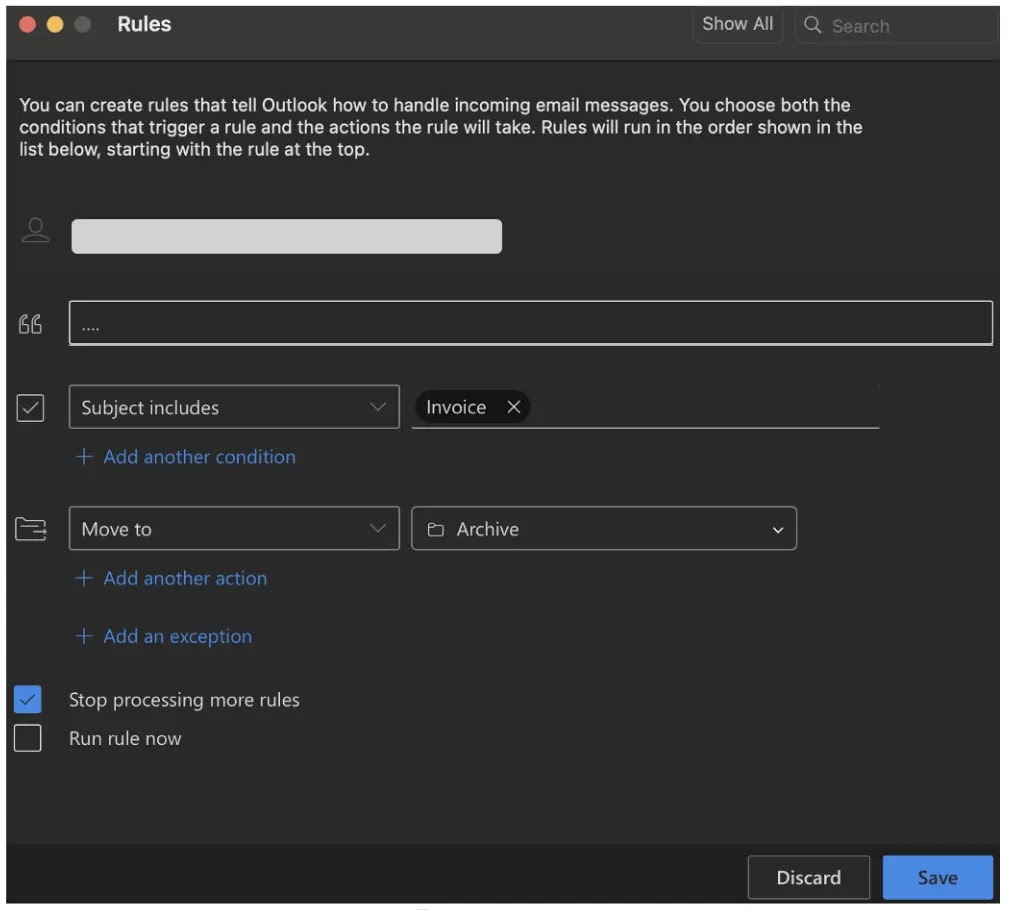
These rules serve multiple malicious objectives simultaneously. They are configured to silently forward emails containing sensitive keywords like “invoice,” “wire,” or “contract” to external email addresses controlled by the attacker. Additionally, they can be used to hide multi-factor authentication (MFA) alerts, password reset emails, and suspicious login warnings, preventing victims from realizing their accounts have been breached. A critical aspect of this technique is its persistence: these rules remain active even after a password reset, allowing attackers to maintain long-term access.
In a documented payroll fraud scenario, an attacker compromised an account and swiftly established a rule to archive any email with “Payment List” in the subject line. The attacker then used Zoho, a third-party email platform, to register a spoofed domain. This domain was crafted using homoglyph characters, which are letters designed to appear nearly identical to those in the legitimate company domain.
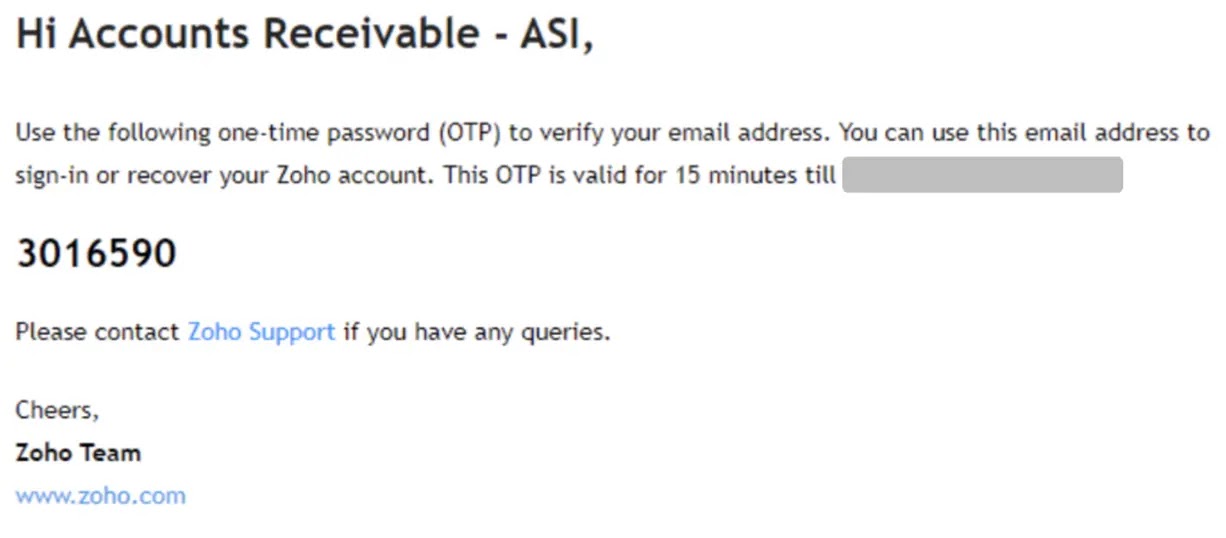
Because the malicious mailbox rule was already active, every verification email from Zoho was automatically moved to a hidden folder. This allowed the attacker to complete the domain registration without the victim’s knowledge. From this newly registered external account, fraudulent messages were then inserted into existing email threads, enabling the manipulation of payment instructions and subsequent financial fraud.
What You Should Do
- Disable Automatic External Forwarding: Configure Exchange Online to disallow automatic forwarding of emails to external domains. This eliminates a primary path for data exfiltration and persistence.
- Enforce Multi-Factor Authentication (MFA) with Conditional Access: Implement strong MFA policies alongside conditional access to significantly reduce the risk of initial account compromise and unauthorized access.
- Regularly Audit Mailbox Rules: Schedule routine audits of all mailbox rules across user accounts to identify and remove any suspicious or unauthorized rules.
- Monitor OAuth Consent Grants: Continuously monitor for suspicious application permissions and OAuth consent grants that could indicate an attacker attempting to establish persistent access.
- Review Entra ID Sign-in Logs: Actively review Entra ID (Azure AD) sign-in logs for unusual login patterns, risky authentication events, or access from unfamiliar geographical locations.
- Revoke Active Sessions: In the event of a detected breach, immediately revoke all active user sessions to force re-authentication and disrupt attacker access.
Disclaimer: HackersRadar reports on cybersecurity threats and incidents for informational and awareness purposes only. We do not engage in hacking activities, data exfiltration, or the hosting or distribution of stolen or leaked information. All content is based on publicly available sources.








No Comment! Be the first one.