



Hackers News Hackers News
  • CyberSecurity News
  • Threats
  • Attacks
  • Vulnerabilities
  • Breaches
  • Comparisons

Social Media

Hackers News Hackers News
  • CyberSecurity News
  • Threats
  • Attacks
  • Vulnerabilities
  • Breaches
  • Comparisons
Search the Site
Popular Searches:
technology Amazon AI
Recent Posts
Hackers Use Microsoft 365 to Control Windows Backdoor
October 1, 2026
Alleged KillSec Ransomware Group Leader Arrested, Servers Dismantled
October 1, 2026
Fake Zoom Installer Delivers CloudSyncD Backdoor to macOS Users
October 1, 2026
Home/Threats/Fake Zoom Installer Delivers CloudSyncD Backdoor to macOS Users
Threats

Fake Zoom Installer Delivers CloudSyncD Backdoor to macOS Users

Key Takeaways A new macOS backdoor, CloudSyncD, is being distributed via a deceptive Zoom installer. The malware tricks users into providing their administrator passwords, bypassing Gatekeeper...

Emy Elsamnoudy
Emy Elsamnoudy
October 1, 2026 7 Min Read
4 0

Key Takeaways

  • A new macOS backdoor, CloudSyncD, is being distributed via a deceptive Zoom installer.
  • The malware tricks users into providing their administrator passwords, bypassing Gatekeeper protections.
  • CloudSyncD establishes persistent communication with command-and-control (C2) servers and can download and execute additional payloads.
  • Jamf Threat Labs researchers discovered the malware, noting its two-stage infection process and novel password exfiltration method.
  • While no direct data exfiltration like browser history or crypto wallets was observed, the backdoor provides attackers with privileged remote access.

Fake Zoom Installer Tricks Mac Users

A sophisticated new backdoor dubbed CloudSyncD is actively targeting macOS users through a deceptive installer disguised as a legitimate Zoom application. This malware not only tricks users into divulging their login credentials but also establishes a persistent foothold on their systems, according to a recent analysis by Jamf said in a report.

Table Of Content

  • Key Takeaways
  • Fake Zoom Installer Tricks Mac Users
  • The Deceptive Installation Process
  • Backdoor Awaits Additional Payloads
  • What You Should Do

The initial sample of this threat emerged on September 15, 2026, still in its developmental stages. However, within just two days, researchers identified subsequent builds connected to active command and control (C2) servers across two distinct domains, signaling an imminent deployment. The full scope of infections, affected organizations, or confirmed data breaches remains undetermined at this time.

Jamf Threat Labs researchers uncovered CloudSyncD during their routine monitoring of executable files uploaded to VirusTotal. Their findings indicate a two-stage infection process where the backdoor payload is embedded directly within the installer, rather than being fetched separately post-execution.

The Deceptive Installation Process

The malicious disk image, typically named Zoom.dmg, presents a highly convincing installation interface. It features a familiar application icon alongside an “Applications” shortcut. Crucially, the background of the installer displays step-by-step instructions that cunningly guide users to navigate to System Settings, then Privacy & Security, where they are prompted to click “Open Anyway” and input their administrator password. This social engineering tactic effectively bypasses macOS’s Gatekeeper security feature, as the application lacks a legitimate developer signature. This method mirrors other recent campaigns involving fake conferencing software updates that manipulate users into overriding security safeguards under the guise of legitimate software installation.
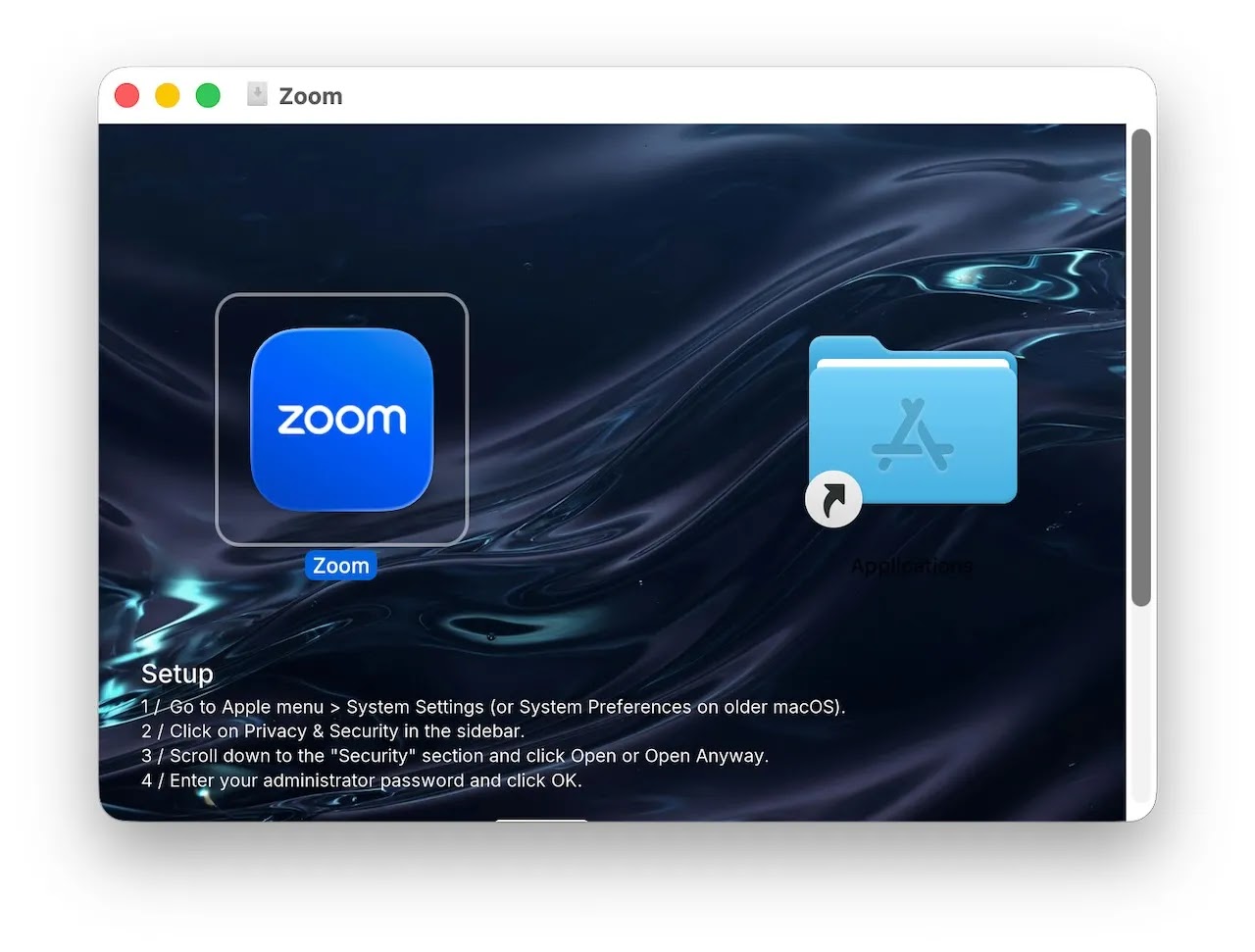
The app_installer dropper (Source - Jamf)
The app_installer dropper (Source – Jamf)

Upon launching the fake Zoom.app, a fabricated authorization dialog appears, requesting the user’s password. The installer validates this input against the local system and repeatedly prompts the user until successful authentication. A simulated download progress bar helps maintain the illusion of a standard software installation process.

The captured administrator password is then covertly stored within a seemingly innocuous settings file (data.json). Its base64-encoded value is embedded between random filler characters, with 48 invisible Unicode characters (U+200B and U+200C) appended to the version field to precisely mark its position and length. While the report details local storage of the password, it does not confirm any immediate transmission of this credential to the attackers.

Initially, the installer attempts to execute its embedded payload directly from memory, a method that failed during testing due to macOS security mechanisms. Consequently, it creates a temporary copy of the backdoor (cshelper) and leverages the previously captured password to launch it with elevated privileges.

Backdoor Awaits Additional Payloads

CloudSyncD is designed for broad compatibility, supporting both Apple Silicon and Intel-based Macs. Upon its initial connection, the backdoor conducts a comprehensive device survey, gathering details such as hardware specifications, operating system information, user and machine names, and network configurations. Subsequent check-ins with the C2 server transmit only the hardware identifier, with active beaconing observed every eight to sixteen seconds.

The C2 server has the capability to deliver encrypted tasks, which can include executable programs either directly or within compressed archives. This mechanism differs from a conventional remote shell, as researchers anticipate the launch of new binaries rather than arbitrary shell commands. This distinction emphasizes the importance of vigilant process monitoring when investigating suspected activity.

A fake authorization prompt (Source - Jamf)
A fake authorization prompt (Source – Jamf)

The communication endpoints for CloudSyncD are designed to mimic requests for a JavaScript library, helping to camouflage the malicious traffic as ordinary web activity. Both stages of the malware accept any presented server certificate, highlighting a disregard for secure communication practices. Furthermore, the analyzed builds share encryption material, providing a valuable opportunity for defenders to correlate samples and decrypt captured communications.

Encrypted implant logs (sync.err) contain vital forensic data, including the contacted C2 server, device identifier, and check-in history. Researchers also noted that the password validation process exposes the user’s supplied credential in process arguments, creating a critical detection opportunity for security tools.

Notably, researchers did not observe any persistence mechanisms, a complete application replacement, or the delivery of remote tasks in the tested samples. Unlike other backdoor infections that establish startup mechanisms, these samples remained at their initial staging locations. This suggests that while a privileged backdoor is operational, not all intended functionalities may have been fully implemented or observed. Jamf recommends implementing robust endpoint and web protections to block and report similar threats.

What You Should Do

  • Be Skeptical of Unsolicited Software: Always download applications directly from official vendor websites or the macOS App Store. Avoid installing software from third-party sites, email attachments, or pop-up advertisements.
  • Verify Digital Signatures: Before installing any application, check its digital signature to ensure it comes from a trusted developer. macOS Gatekeeper will warn you about unsigned applications; heed these warnings.
  • Exercise Caution with Password Prompts: Be extremely wary of any application installer that requests your administrator password outside of standard macOS system prompts. Always scrutinize the context and legitimacy of such requests.
  • Enable and Maintain Security Software: Ensure your macOS device has reputable antivirus or endpoint detection and response (EDR) software installed and kept up-to-date.
  • Monitor Network Traffic: For organizations, monitor network traffic for connections to suspicious domains like orchid-led[.]com and bjzhishang[.]com, or unusual requests for JavaScript-like resources from unexpected IPs.
  • Review System Logs and Processes: Regularly review system logs for unusual process arguments, especially those involving password validation, and look for temporary files with patterns like .app_swap_ or .s_ in the $TMPDIR directory.
  • Educate Users: Implement ongoing security awareness training to educate users about phishing, social engineering tactics, and the importance of verifying software sources.

Indicators of compromise (IoCs):-

Type Indicator Description
SHA-256 faf2eea05f3c9f1c4ef8f6be339f5459a38f95cfd9d512bc24e2803230e5c7bf Distribution disk image.
SHA-256 524a7bcc8edcadc6f4381459f79769e1ec534aa78f66e5c38a6678bd55cf2572 Development-build dropper, arm64.
SHA-256 071d58f590d155b8ef991a9fe6f9c0a85ccc190d5266c770b5296e4550e084a5 Embedded development-build implant, universal binary.
SHA-256 74fea25aba11fef0572ecef3dda0c819e6841150f3154bee2e26ec71c06c85ed Embedded development implant, arm64 slice, 379,600 bytes.
SHA-256 8371abbfeb3dbab1581eee54688ecd1f0640dc013ddb419c4332fcd954f9d2bc Embedded development implant, x86_64 slice, 351,392 bytes.
SHA-256 f7d8a7593ccbbcb05fde2bf110e1c5d09b18f711219e6b80edda83ae8b41a1e1 On-disk implant copy, arm64 slice, 379,600 bytes.
Shared content hash b3acff0abcdde6adc91cb97461b4d902ff19375752afa2f778f682f5102bdfc4 Hash of 371,408 arm64 bytes preceding the code signature; matches both development copies.
SHA-256 74dfa21b837c0c4e6abd428a1370ccd8779428d2c9362981a06ce26c6a58b353 Live x86_64 dropper using the orchid-led endpoint.
SHA-256 5f2aebc518a56ebe0cc9171553e2c5973ddbfa79042c1c76b665d8b465c1695d Corresponding live arm64 dropper using the orchid-led endpoint.
SHA-256 cc54d90920a73cc5e176664f61c6f601c95d693e431e79ae1148cb91e83c9235 Live arm64 dropper using the bjzhishang endpoint.
SHA-256 989c2235b3deec9a0d7cb3eb10d8148735cb704dc85de4e16211381fa794dca1 Corresponding live x86_64 dropper using the bjzhishang endpoint.
SHA-256 63c88ba846d1adf047417502e67a20f6e52414fea4b4b80aa66c5a371f53dcd6 Orchid-led implant, universal binary, 678,336 bytes.
SHA-256 54efb0e308c93e448187ca53abe62eca6521bc84852a63b2ffefdd00e9771882 Orchid-led implant, x86_64 slice, 325,904 bytes.
SHA-256 96e039a67b2ab39e36d57a988b3af16b2822d9dfaa70892be06178826b1eb261 Orchid-led implant, arm64 slice, 334,272 bytes.
SHA-256 edcd4a8ca2d525f26b8cd05a533585842b1e38216d98e385e25abf8703d31010 Bjzhishang implant, universal binary, 756,432 bytes.
SHA-256 c279201898cb0c645343a0e3b4215ad324b0edacc4df799f22e78a8cfbe10d06 Bjzhishang implant, arm64 slice, 379,600 bytes.
SHA-256 06ab1e44941e0ceea9df11729576a091fa8c0388188b599f0ee51c54ee0a3186 Bjzhishang implant, x86_64 slice, 351,392 bytes.
C2 URL hxxps://orchid-led[.]com/macos/jquery[.]js Live command-and-control endpoint.
C2 URL hxxps://bjzhishang[.]com/macos/jquery[.]js Second live command-and-control endpoint.
Domain orchid-led[.]com Live command-and-control domain.
Domain bjzhishang[.]com Second live command-and-control domain.
C2 URL hxxp://192[.]168[.]2[.]133:9099/ops Development-build endpoint; private network address that did not answer during testing.
IP address 192[.]168[.]2[.]133 Private development endpoint, not a public attack-infrastructure address.
URL path /macos/jquery[.]js Shared live endpoint path disguised as a JavaScript resource.
Filename Zoom.dmg Malicious distribution disk image.
Application bundle Zoom.app Bundle impersonating the legitimate conferencing client.
Volume name Zoom Mounted disk-image volume name.
Filename app_installer Stage-one dropper executable.
Filepath /Volumes/Zoom/Zoom.app/Contents/MacOS/app_installer Dropper location in the mounted image.
Relative filepath Zoom.app/Contents/MacOS/app_installer Dropper bundle path reported in the analysis.
Filename appd Configured stage-two payload filename.
Filename cshelper On-disk payload filename and signing identifier.
Filepath /Volumes/Zoom/Zoom.app/Contents/Resources/cshelper On-disk copy of the embedded implant.
Signing identifier main-arm64.out Identifier retained in embedded arm64 payload signatures.
Process name cloudsyncd Configured daemon name and process disguise; not observed as a runtime rename.
Directory ~/.local/share/cloudsync/ Configured implant installation directory.
Log filepath ~/.local/share/cloudsync/.config/logs/sync.err Encrypted implant log containing session and beacon information.
Filename sync.err Implant log filename.
Configuration filepath ~/.config/<name>/data.json Decoy configuration pattern; source reports mode 0644.
Filename data.json Settings file concealing the captured login password.
Directory ~/.config/zoom/ Development-build configuration directory.
Directory ~/.config/cloudsync/ Live-build configuration directory.
Unicode marker U+200B Zero Width Space used in the hidden credential index.
Unicode marker U+200C Zero Width Non-Joiner used in the hidden credential index.
Temporary filepath $TMPDIR/.app_swap_<pid>.sh Self-deleting application-bundle replacement script.
Filename pattern .app_swap_<pid>.sh Runtime-generated bundle-swap script name.
Filename prefix .app_swap_ Recommended hunting prefix for the transient replacement script.
Temporary filepath $TMPDIR/.s_XXXXXX Stage-two temporary-file fallback passed to privileged execution.
Filename prefix .s_ Recommended hunting prefix for temporary stage-two payloads.
Temporary directory $TMPDIR/.opXXXXXX/ Directory used to unpack tasked payload archives; removed after use.
Temporary filepath <install dir>/.t_XXXXXX Tasked-payload fallback; unlinked after launch.
Filename p.tgz Task archive extracted inside the temporary task directory.
Directory pattern bin/ Extracted executable tree inside a tasked package.
Payload path pattern bin/<daemon> Executable location within a server-delivered archive.
Package filename .r.tar.gz Intended replacement-application package; its download URL was empty in analyzed builds.
Extended attribute com.apple.provenance Attribute stripped from a tasked-payload fallback before execution.
C2 channel key 61957119137f9492ab7cff41ed83619c Encryption material reused across development and live builds.
C2 initialization vector d398b8d4 Initialization vector reused across analyzed builds.
String obfuscation key D7 19 BF 57 E6 5B A0 9D E1 BA CD B1 82 C9 91 18 ED AF D5 18 FD 3A 4A 97 97 BC AD 22 1A DB 81 51 Shared 32-byte obfuscation table in both malware stages.
Command line /usr/bin/dscl /Local/Default -authonly <user> <password> Local password validation; exposes the credential in process arguments.
Command line /usr/bin/sudo -S --preserve-env=HOME,USER $TMPDIR/.s_XXXXXX Privileged implant launch using the captured password on standard input.
Command line sh -c mkdir -p '<install dir>/.config/logs' 2>/dev/null Creates the implant’s logging directory.
Command line sh -c /usr/sbin/ioreg -rd1 -c IOPlatformExpertDevice 2>/dev/null Collects the host hardware identifier.
Process command /usr/bin/tar xzf -C Archive extraction command used for server-delivered tasks.
Interpreter /bin/bash Interpreter used for the transient bundle-swap script; not malicious by itself.
Execution path /dev/fd Attempted fileless execution route that failed during testing.
Sample collection URL VirusTotal collection Source-provided sample collection, not malicious infrastructure.

Disclaimer: HackersRadar reports on cybersecurity threats and incidents for informational and awareness purposes only. We do not engage in hacking activities, data exfiltration, or the hosting or distribution of stolen or leaked information. All content is based on publicly available sources.


Tags:

AttackExploitMalwareSecurityThreat

Share Article

Emy Elsamnoudy

Emy Elsamnoudy

Emy is a cybersecurity analyst and reporter specializing in threat hunting, defense strategies, and industry trends. With expertise in proactive security measures, Emily covers the tools and techniques organizations use to detect and prevent cyber attacks. She is a regular speaker at security conferences and has contributed to industry reports on threat intelligence and security operations. Emily's reporting focuses on helping organizations improve their security posture through practical, actionable insights.

Previous Post

Chinese Hackers Impersonate Anthropic Employee to Target US AI Policy Experts

Next Post

Alleged KillSec Ransomware Group Leader Arrested, Servers Dismantled

No Comment! Be the first one.

Leave a Reply Cancel reply

Your email address will not be published. Required fields are marked *

Popular Posts
WordPress Malware Returns With Self-Healing Backdoor
October 1, 2026
Warlock Ransomware Exploits Critical SharePoint Flaws in Water, Telecom Attacks
October 1, 2026
Critical Axios HTTP/2 Vulnerabilities Allow SSRF and DoS Attacks
October 1, 2026
Top Authors
Marcus Rodriguez
Marcus Rodriguez
David kimber
David kimber
Jennifer sherman
Jennifer sherman
Let's Connect
156k
2.25m
285k

Related Posts

Jennifer sherman
By Jennifer sherman
Threats

GlassWorm Attacks macOS via Malicious VS Code…

January 1, 2026
Emy Elsamnoudy
By Emy Elsamnoudy
Attacks

ClickFix Attack Hides Malicious Code via Stegan Security

January 1, 2026
Sarah simpson
By Sarah simpson
Vulnerabilities

MongoBleed Detector Tool Released to Detect MongoDB Vulnerability(CVE-2025-14847)

January 1, 2026
Emy Elsamnoudy
By Emy Elsamnoudy
Breaches

Conti Ransomware Gang Leaders & Infrastructure Exposed

January 1, 2026
Hackers News Hackers News
  • [email protected]

Quick Links

  • Contact Us
  • Privacy Policy
  • Terms of service

Categories

Attacks
Breaches
Comparisons
CyberSecurity News
Threats
Vulnerabilities

Let's keep in touch

receive fresh updates and breaking cyber news every day and week!

All Rights Reserved by HackersRadar ©2026

Follow Us




