




Microsoft Urges IT Admins to Prepare for Windows 11 26H2 Update
Key Takeaways Microsoft is prompting IT administrators to prepare for the upcoming Windows 11 version 26H2 update. The update leverages a shared servicing branch model, simplifying deployment for...

Key Takeaways
- Microsoft is prompting IT administrators to prepare for the upcoming Windows 11 version 26H2 update.
- The update leverages a shared servicing branch model, simplifying deployment for most organizations.
- Devices running Windows 11 version 26H1 will require a full upgrade, not a direct update, due to core differences.
- The new version resets support timelines, offering 24 months for Home/Pro editions and 36 months for Enterprise/Education/IoT Enterprise.
- IT teams should begin validation testing within their environments using the Windows Insider Program.
Microsoft has issued a strong recommendation to IT administrators, urging them to commence preparations for the impending Windows 11 version 26H2 update. This latest iteration is currently accessible for testing via the Windows Insider Program, signaling its approaching general release.
Table Of Content
The introduction of version 26H2 underscores Microsoft’s ongoing strategic shift towards a more predictable and less disruptive servicing framework. This model is specifically engineered to streamline deployment and maintenance efforts for enterprise environments, mitigating common challenges associated with traditional operating system upgrades.
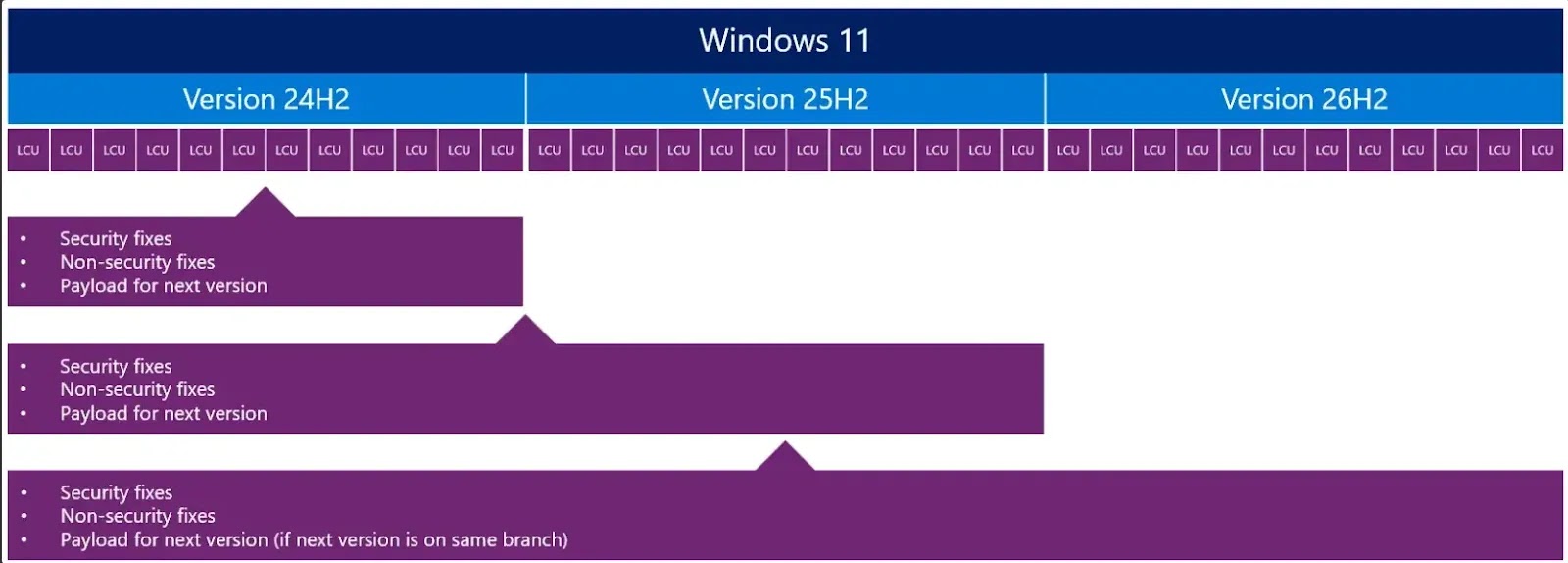
Crucially, Windows 11 version 26H2 distinguishes itself from conventional feature upgrades by utilizing the identical shared servicing branch as its predecessors, versions 24H2 and 25H2. This architectural choice is central to Microsoft’s updated delivery mechanism.
Instead of requiring a complete operating system replacement, this methodology enables Microsoft to distribute new features through a compact enablement package. This significantly reduces the inherent complexity of deployment, allowing for a more agile and efficient update process.
For organizations already operating on supported Windows 11 builds, the 26H2 update will function much like a standard monthly cumulative update. This means a rapid installation process, minimal disruption for end-users, and the elimination of the need for full system reimaging or intricate migration workflows.
Understanding the Shared Servicing Model
Despite the streamlined process for most, Microsoft has clarified that devices running Windows 11 version 26H1 will not qualify for a direct upgrade to 26H2. This limitation stems from fundamental differences in the underlying Windows core between these specific versions, necessitating a full upgrade path for 26H1 users.
The shared servicing model ensures that various Windows versions operate on a consistent codebase. This uniformity guarantees that all supported versions receive identical security and quality updates and undergo consistent compatibility validation. Feature disparities between versions are introduced incrementally, allowing enterprises to integrate new capabilities without introducing significant operational risks.
This innovative model delivers substantial benefits for IT departments. It dramatically reduces deployment complexity by eliminating the need for large-scale, disruptive upgrade events. Furthermore, it enhances compatibility confidence, as applications and configurations validated on earlier versions are expected to remain functional post-update.

Organizations also gain from a faster time-to-value, as smaller updates facilitate quicker adoption of new features. From a lifecycle management perspective, upgrading to Windows 11 version 26H2 effectively resets support timelines.
Microsoft has confirmed that Home, Pro, and Pro for Workstations editions will receive 24 months of support. In contrast, Enterprise, Education, and IoT Enterprise editions will benefit from an extended 36 months of support. This makes annual feature updates an essential component for maintaining a secure and compliant IT environment.
Preparation and Deployment Guidance
Microsoft recommends that organizations initiate their preparation by validating the 26H2 update within their existing environments. IT teams should thoroughly test compatibility across applications, policies, and infrastructure. This initial validation should leverage devices enrolled in the Windows Insider Program, particularly those within the Experimental channel. Broader validation can then proceed once the update transitions to the Release Preview stage.
Deployment of Windows 11 version 26H2 will be supported through standard enterprise management tools, including Microsoft Intune, Windows Autopatch, and Windows Server Update Services (WSUS). Administrators are advised to adhere to established rollout strategies, beginning with pilot groups and gradually expanding deployment based on the outcomes of their testing.
For instance, an enterprise utilizing Intune could deploy 26H2 to a small ring of test devices, meticulously monitoring performance and compatibility. Once stability is confirmed, deployment can be progressively extended across various departments. Microsoft emphasizes that maintaining current monthly updates will further streamline this transition, as continuous feature delivery inherently reduces the size and impact of annual releases. The company plans to release additional guidance as Windows 11 version 26H2 approaches general availability.
What You Should Do
- Begin validating Windows 11 version 26H2 in your test environments using the Windows Insider Program (Experimental channel initially).
- Thoroughly test application compatibility, group policies, and infrastructure interactions with the new update.
- Plan your deployment strategy, starting with small pilot groups and gradually expanding based on successful testing.
- Ensure your current Windows 11 devices are up-to-date with the latest monthly cumulative updates to facilitate a smoother transition.
- For devices running Windows 11 version 26H1, prepare for a full upgrade rather than a direct update to 26H2.
Disclaimer: HackersRadar reports on cybersecurity threats and incidents for informational and awareness purposes only. We do not engage in hacking activities, data exfiltration, or the hosting or distribution of stolen or leaked information. All content is based on publicly available sources.









No Comment! Be the first one.