




Critical WP Maps Pro Flaw Lets Attackers Create Admin Accounts
Key Takeaways A critical unauthenticated privilege escalation vulnerability (CVE-2026-8732) has been discovered in the WP Maps Pro WordPress plugin. The flaw allows attackers to create unauthorized...

Key Takeaways
- A critical unauthenticated privilege escalation vulnerability (CVE-2026-8732) has been discovered in the WP Maps Pro WordPress plugin.
- The flaw allows attackers to create unauthorized administrator accounts on affected websites, leading to full site compromise.
- All plugin versions up to 6.1.0 are impacted; an urgent update to version 6.1.1 is available and strongly recommended.
- The vulnerability stems from an insecure AJAX endpoint that bypasses authentication and nonce checks.
Critical Flaw in WP Maps Pro Exposes 15,000 WordPress Sites to Admin Account Creation
A severe security vulnerability in the widely used WP Maps Pro WordPress plugin could enable malicious actors to seize complete control of websites by illicitly generating administrator accounts. This critical flaw, identified as CVE-2026-8732, carries a CVSS score of 9.8 and affects all versions of the plugin up to and including 6.1.0, posing a significant threat across the WordPress ecosystem.
Table Of Content
Unauthenticated Privilege Escalation Threatens WordPress Installations
The vulnerability was brought to light by security researcher David Brown and reported through the Wordfence Bug Bounty Program, for which Brown received a $1,950 reward. WP Maps Pro is a popular plugin, with over 15,000 sales on CodeCanyon, primarily utilized for embedding customizable Google Maps with advanced location functionalities on WordPress sites.
At the heart of the issue is an unauthenticated privilege escalation flaw within the plugin’s AJAX capabilities. Specifically, the wpgmp_temp_access_ajax action is incorrectly registered, allowing unauthenticated access. While the function does incorporate a nonce check, this security measure is rendered ineffective because the nonce itself is publicly accessible within the frontend JavaScript.
Exploiting this weakness, attackers can send a specially crafted request containing a parameter that triggers the plugin’s temporary access feature. This feature, originally intended to provide support staff with temporary login capabilities, critically lacks proper authorization checks. Consequently, the plugin automatically creates a new user with administrator privileges using built-in WordPress functions.
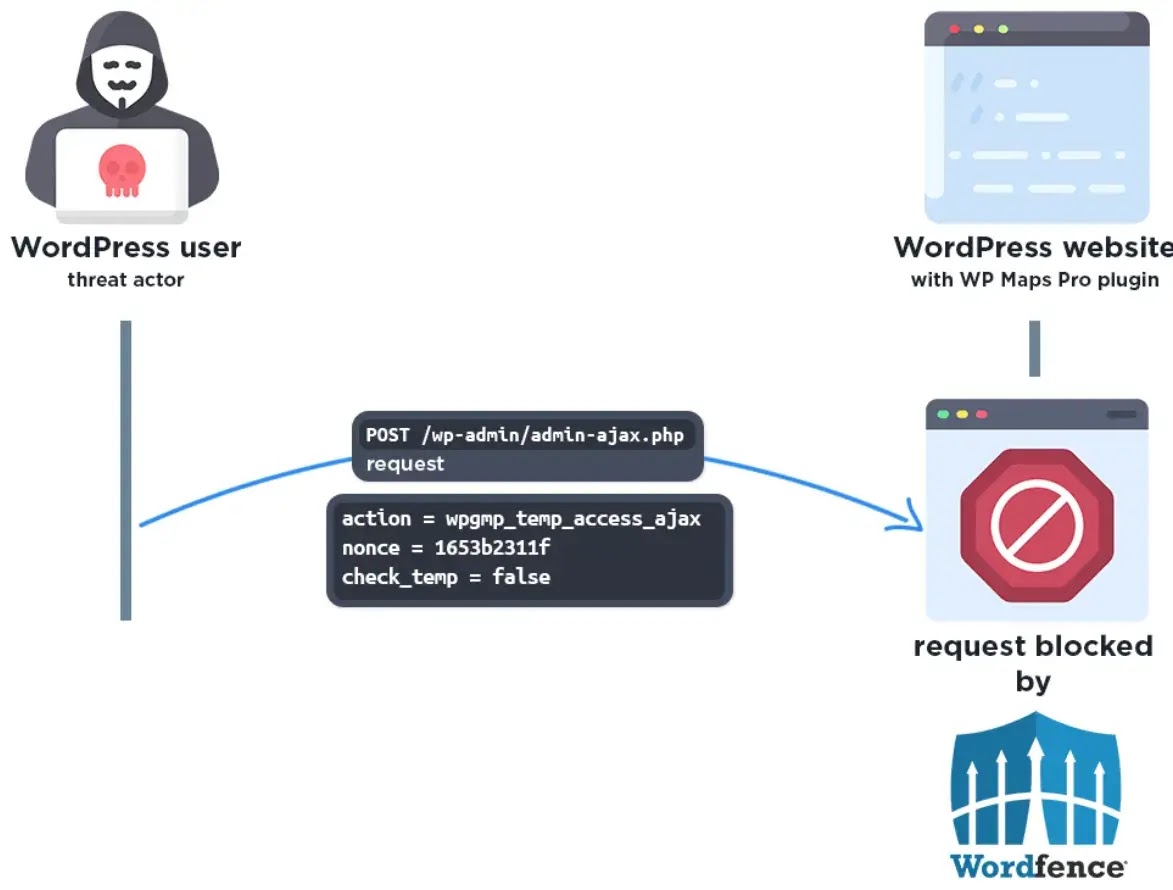
Upon successful account creation, the plugin generates a “magic login URL” that facilitates passwordless authentication. By visiting this URL, an attacker is automatically logged in as an administrator via a session cookie, granting them unfettered control over the compromised website. This level of access allows for a range of malicious activities, including installing rogue plugins, injecting backdoors, altering site content, or exfiltrating sensitive data.
Vendor Response and Mitigation Efforts
The vendor has released version 6.1.1 to address the vulnerability. This update incorporates a robust capability check using current_user_can('manage_options'), thereby restricting access to this sensitive functionality exclusively to authenticated administrators.
Wordfence responded proactively by deploying a firewall rule on May 18, 2026, to protect its premium, care, and response customers. Users of the free Wordfence version are slated to receive the same protection on June 17, 2026. Due to the absence of direct vendor contact, the vulnerability disclosure process was coordinated through Envato’s security team.
This incident underscores the persistent dangers associated with improperly secured AJAX endpoints and highlights the paramount importance of implementing stringent access controls during plugin development.
What You Should Do
- Update Immediately: All users of the WP Maps Pro plugin are strongly advised to update to version 6.1.1 without delay. Outdated versions are highly vulnerable to unauthenticated exploitation.
- Verify Admin Accounts: Regularly review your WordPress site for any unauthorized or suspicious administrator accounts and remove them promptly.
- Implement Web Application Firewall (WAF): Utilize a WAF solution, such as Wordfence, to provide an additional layer of protection against known and emerging threats.
- Regular Backups: Maintain regular, secure backups of your WordPress website to facilitate recovery in the event of a compromise.
Disclaimer: HackersRadar reports on cybersecurity threats and incidents for informational and awareness purposes only. We do not engage in hacking activities, data exfiltration, or the hosting or distribution of stolen or leaked information. All content is based on publicly available sources.








No Comment! Be the first one.