




Phishing Campaign Impersonates ChatGPT to Steal OpenAI Credentials
Key Takeaways A new phishing campaign is leveraging fake ChatGPT subscription renewal notices to steal OpenAI user credentials. The attacks exploit users’ familiarity with billing issues and...

Key Takeaways
- A new phishing campaign is leveraging fake ChatGPT subscription renewal notices to steal OpenAI user credentials.
- The attacks exploit users’ familiarity with billing issues and the widespread use of AI services like ChatGPT.
- Successful compromise can lead to the theft of user conversations, account takeover, and potential abuse in further social engineering schemes.
- The phishing emails feature convincing branding and urgent calls to action, redirecting victims to malicious login pages.
- Users are advised to independently verify billing notifications and practice strong password hygiene, including multi-factor authentication.
Cybersecurity researchers have uncovered an active phishing campaign impersonating ChatGPT subscription alerts to compromise user accounts. This sophisticated social engineering tactic aims to trick users into divulging their OpenAI credentials by presenting a seemingly legitimate billing problem.
Table Of Content
The campaign leverages a common user concern—an expiring subscription or failed payment—to create a sense of urgency, compelling recipients to interact with malicious links. If successful, attackers can gain unauthorized access to OpenAI accounts, potentially exposing sensitive conversations and providing a foothold for further malicious activities.
The phishing emails are designed to appear authentic, featuring the official ChatGPT logo and urgent language such as “Subscription Payment Required.” Victims are prompted to click a prominent “Update Payment Information” button, which redirects them to a fraudulent sign-in page. For individuals who use ChatGPT for both personal and professional tasks, a compromised account could extend the risk beyond personal data to corporate systems if password reuse or similar email habits are present.
Hackers Impersonate ChatGPT Subscription Alerts
Analysts at Cofense identified this fraudulent subscription invoice email, noting its primary objective is to harvest OpenAI account credentials. The effectiveness of this phishing attempt lies in its careful replication of legitimate branding, payment terminology, and a convincing login interface, which collectively reduce a user’s suspicion, as Cofense said in a report shared with Cyber Security News (CSN).
The email’s design meticulously mimics genuine OpenAI communications. It uses the ChatGPT logo and includes text like “Subscription Payment Required.” The call to action is a large “Update Payment Information” button. The message concludes with a sign-off from “The OpenAI Team,” creating an illusion of authenticity.
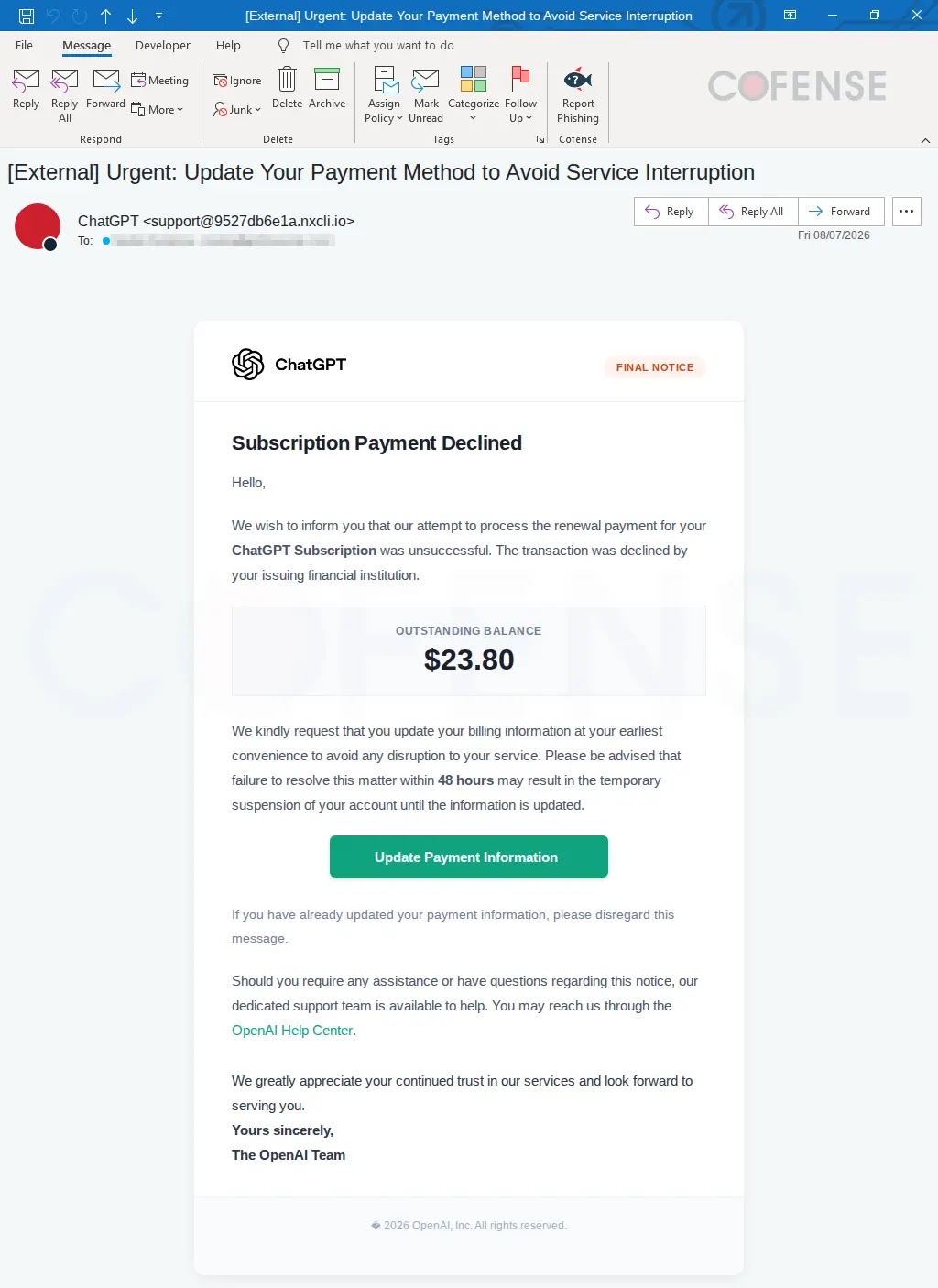
Despite the convincing appearance, critical discrepancies exist. The sender’s email address, for instance, does not belong to OpenAI, indicating a clear red flag. Furthermore, hovering over the “Update Payment Information” button reveals a deceptive URL that does not lead to an official OpenAI account management page. Instead, the link initially uses a Google API wrapper before redirecting to attacker-controlled infrastructure.
Upon clicking the malicious link, victims are directed to a phishing page designed to closely resemble the authentic ChatGPT login interface, complete with familiar branding, text, and icons. However, the URL for this page is not the legitimate OpenAI authentication address. Any credentials entered on this fraudulent page are immediately transmitted to the attackers, and the victim is then redirected to an error message, preventing them from realizing their credentials have been stolen.
This attack strategy bypasses the need for direct compromise of OpenAI’s services. Instead, it capitalizes on user trust in the ChatGPT brand and the common expectation of needing to update billing information for paid services. The use of redirect chains further complicates identification of the malicious destination, making it harder for users to spot the deception.
How Users Can Spot the Lure
To mitigate the risk of falling victim to such phishing attempts, users should exercise extreme caution when encountering unexpected billing notifications. The safest course of action is to avoid clicking any embedded links or buttons within the suspicious email. Instead, users should independently navigate to the service’s official website via a trusted bookmark or by directly typing the URL into their browser. This method ensures that they access the legitimate platform and bypass any attacker-controlled routes.
.webp)
Users should always inspect the full sender address of an email, not just the display name, which can be easily faked. Crucially, hovering over any links before clicking them can reveal the true destination URL. A domain that does not match the expected service provider is a clear indicator of a phishing attempt. Furthermore, users should meticulously check the official login address, especially when encountering pages that closely mimic legitimate designs or immediately demand payment details.
What You Should Do
- **Verify Directly:** Never click links in suspicious emails. Instead, manually navigate to the official ChatGPT or OpenAI website to check your subscription status or make any necessary updates.
- **Inspect Sender Details:** Always examine the full sender email address, not just the display name. Look for discrepancies that indicate the email is not from an official source.
- **Hover Over Links:** Before clicking, hover your mouse cursor over any embedded links to reveal the actual URL. If it doesn’t lead to an official openai.com domain, do not click it.
- **Use Unique Passwords:** Employ strong, unique passwords for all your online accounts. This prevents a compromise of one account from affecting others.
- **Enable Multi-Factor Authentication (MFA):** Activate MFA on your OpenAI account and any other critical services. While not foolproof against all phishing, it adds a significant layer of security.
- **Report Suspicious Emails:** If you receive a phishing email, report it to your email provider and, if applicable, your organization’s IT security team.
- **Monitor Account Activity:** Regularly review your account activity and payment settings for any unauthorized changes or transactions.
- **Educate Yourself:** Stay informed about common phishing tactics, especially those related to services you frequently use.
Indicators of Compromise (IoCs):-
| Type | Indicator | Description |
|---|---|---|
| Email address | support@9527db6e1a[.]nxcli[.]io |
Sender address used in the observed phishing email |
| URL | hXXps://notifications[.]googleapis[.]com/email/redirect?t=AFG8qyW_Su5pVpWF_Tm7YFcNgju_01zhPKtjCpIcIfTVDTsqk_NT5E4LWD15nZyb_erqo |
Stage 1 observed email infection URL |
| URL | hXXps://e83cedb076[.]nxcli[.]io/fertaq/app/key[.]php |
Stage 2 observed payload URL |
| URL | hXXps://e83cedb076[.]nxcli[.]io/fertaq/app/login[.]php |
Stage 2 observed payload URL |
Note: IP addresses and domains are intentionally defanged (e.g., [.]) to prevent accidental resolution or hyperlinking. Re-fang only within controlled threat intelligence platforms such as MISP, VirusTotal, or your SIEM.
Disclaimer: HackersRadar reports on cybersecurity threats and incidents for informational and awareness purposes only. We do not engage in hacking activities, data exfiltration, or the hosting or distribution of stolen or leaked information. All content is based on publicly available sources.







No Comment! Be the first one.