




RokRAT Malware Targets Researchers With Fake Academic Event Materials
Key Takeaways A sophisticated phishing campaign, dubbed “Operation Capsule Vault,” is targeting researchers with fake academic event materials. The campaign delivers a variant of the...

Key Takeaways
- A sophisticated phishing campaign, dubbed “Operation Capsule Vault,” is targeting researchers with fake academic event materials.
- The campaign delivers a variant of the RokRAT remote access trojan (RAT) through seemingly legitimate ISO files hosted on cloud services like Dropbox.
- Attackers exploit trust by weaponizing details from real academic conferences, making their lures highly convincing.
- RokRAT is injected into the
explorer.exeprocess, allowing it to evade detection and exfiltrate sensitive data, including screenshots and files.
Hackers Leverage Real Academic Event Materials to Distribute RokRAT
Cybersecurity researchers have uncovered a cunning phishing operation specifically targeting academics and researchers. This campaign, named “Operation Capsule Vault” by Genians, employs genuine details from academic events to distribute a variant of the RokRAT malware. The attackers craft highly convincing lures by embedding a malicious payload within what appears to be a legitimate document package related to a real seminar.
Table Of Content
The attackers meticulously gather information from actual academic conferences to construct spear-phishing emails that mimic routine professional correspondence. These emails then direct unsuspecting recipients to cloud-hosted ISO files, masquerading as standard conference material downloads. This tactic significantly increases the likelihood that recipients will open the malicious file, believing it to be a harmless resource.
The Deceptive Lure: Honsan Kalma Tourism Forum
One notable example of this tactic involved emails claiming to distribute materials for the Honsan Kalma Tourism Forum, an event that took place in Seoul on June 9. The attackers impersonated a separate organization, framing the emails as typical business notices containing relevant conference information. This strategic impersonation adds a layer of authenticity, making the phishing attempt difficult to discern from legitimate communications.
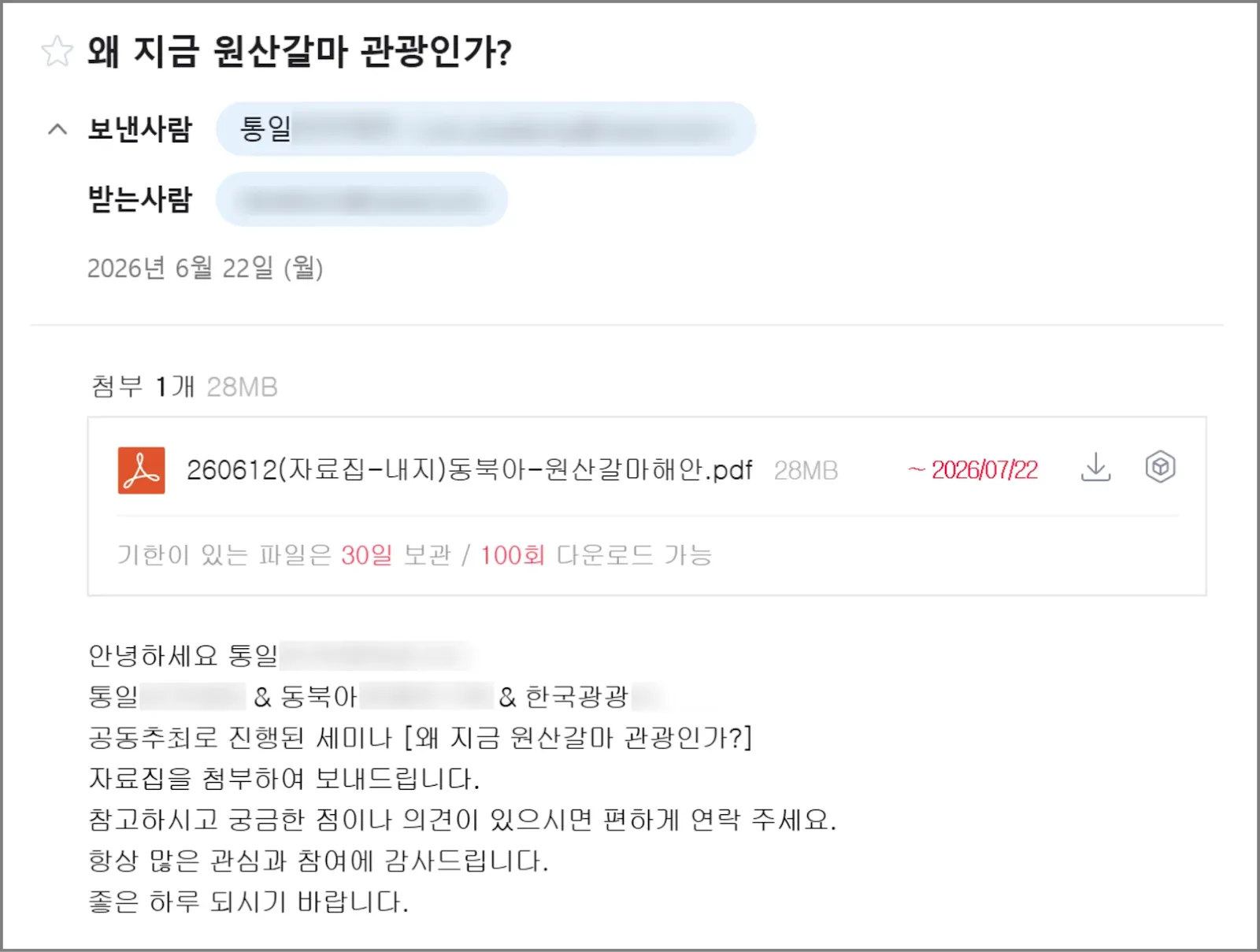
Instead of attaching a conventional document directly, the phishing emails linked to an ISO image hosted on Dropbox. This ISO file bore a filename consistent with a seminar booklet and contained an executable disguised as a PDF document. This exploit leverages the common Windows setting that hides known file extensions, leading users to believe they are opening a PDF when, in fact, they are launching a malicious program. Upon execution, the deceptive file displays the expected academic content, while the RokRAT malware covertly initiates its malicious operations in the background. This dual-pronged approach aims to minimize suspicion by providing the victim with seemingly relevant material.
Analysis revealed that while the lure document contained content genuinely related to the Honsan Kalma Tourism Forum, its creation metadata showed a significant time discrepancy, indicating that the file was not an authentic handout from the event. This detail served as a critical red flag for security analysts.
RokRAT Employs Process Injection and Cloud C2 for Evasion
The RokRAT loader operates in multiple stages. It first restores shellcode in memory, then injects the primary RokRAT payload into explorer.exe, a legitimate Windows process. Executing within a trusted system process helps the malware evade detection by security solutions that primarily monitor for newly created or suspicious processes.
Once active, RokRAT commences gathering system intelligence and establishing communication channels with its command-and-control (C2) infrastructure. The Genians report highlights that the malware supports popular cloud services such as Dropbox, pCloud, and Yandex for its C2 operations, utilizing distinct channels for receiving commands and exfiltrating stolen data. This reliance on legitimate cloud platforms further complicates detection and blocking efforts.
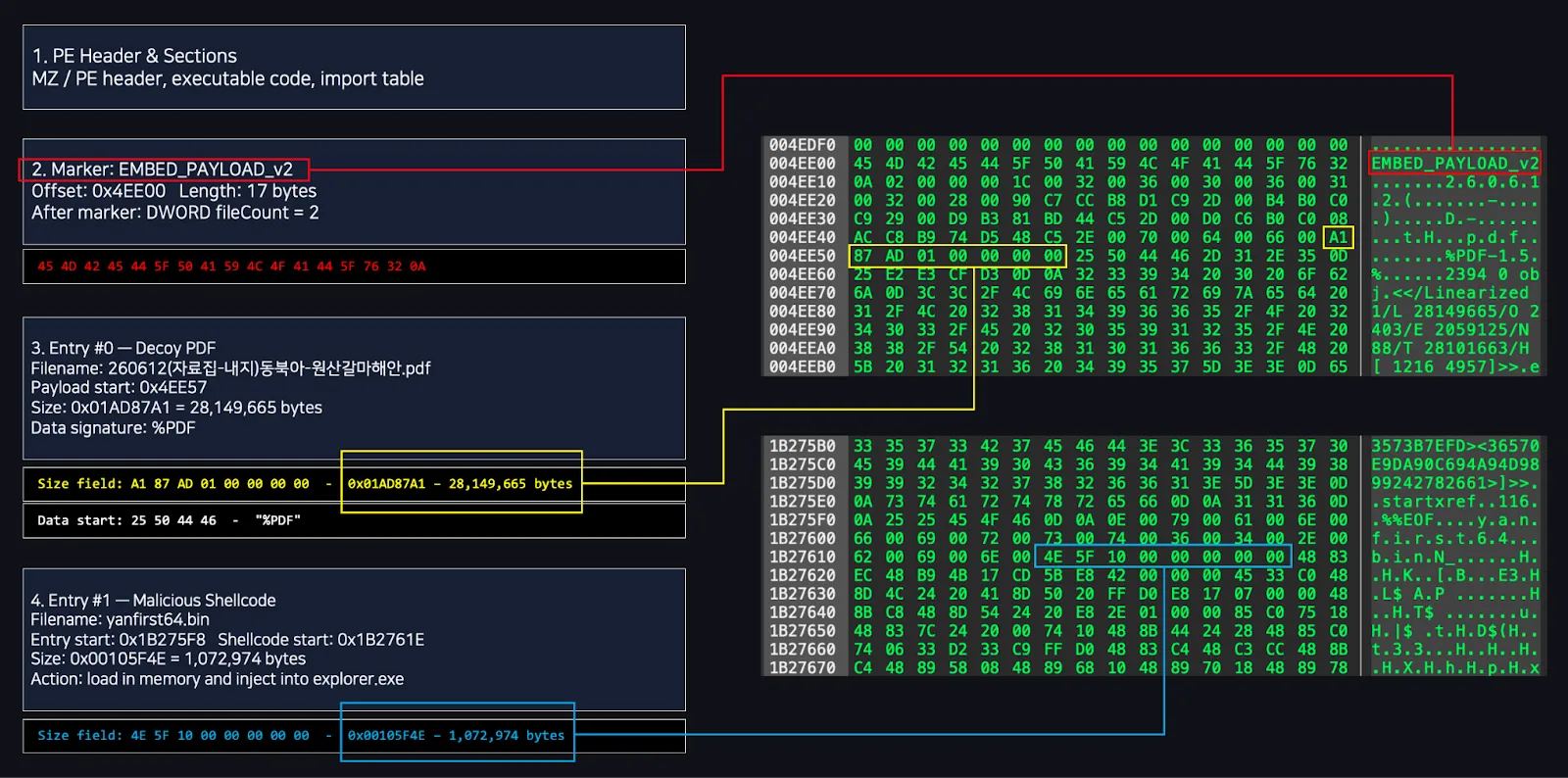
The capabilities of RokRAT are extensive, allowing it to capture screenshots, collect arbitrary files, enumerate local and network drives, gather process information, and execute arbitrary commands issued by its operators. Furthermore, the malware possesses a cleanup function, enabling it to remove its traces, including temporary files and entries in the Startup folder, upon receiving specific instructions.
Researchers linked this campaign to the broader RokRAT malware family due to observed similarities in its cloud-service integration, command handling mechanisms, and code structure with previous RokRAT activities. While acknowledging the complexities of attribution, analysts suggest a likely connection to the advanced persistent threat (APT) group known as APT37, emphasizing the need to consider infrastructure, victim profiles, tactics, and other evidence for conclusive identification. The full Genians report provides a detailed analysis of the attack flow and indicators of compromise.
Organizations and individuals in the research and academic sectors must exercise extreme caution when encountering unexpected emails containing event materials. Thorough verification through official channels is paramount before interacting with any links or attachments.
What You Should Do
- Verify Email Authenticity: Always confirm the legitimacy of emails, especially those containing links or attachments, by contacting the sender through official, known channels (e.g., phone, official website) rather than replying to the email itself.
- Exercise Caution with Cloud Links: Be suspicious of unsolicited links to cloud storage services (Dropbox, pCloud, Yandex, etc.), even if they appear to come from a known sender.
- Enable File Extension Display: Configure Windows to display full file extensions to prevent executables from masquerading as benign document types (e.g.,
.pdf.exe). - Implement Advanced Endpoint Detection: Utilize Endpoint Detection and Response (EDR) solutions to monitor for unusual process injection, suspicious executable behavior, and abnormal network connections to cloud services.
- User Awareness Training: Conduct regular cybersecurity awareness training for all staff, particularly researchers and academics, on identifying sophisticated phishing attempts and the risks associated with opening untrusted files.
- Monitor Network Traffic: Implement network monitoring to detect unusual outbound connections to cloud storage services or unexpected C2 traffic patterns.
Disclaimer: HackersRadar reports on cybersecurity threats and incidents for informational and awareness purposes only. We do not engage in hacking activities, data exfiltration, or the hosting or distribution of stolen or leaked information. All content is based on publicly available sources.









No Comment! Be the first one.